UTM Builder
A UTM builder is a tool that appends tracking parameters to a landing page URL. It takes the base URL, keeps…
Percent encode or decode URLs and query strings, with every parameter shown in plain text.
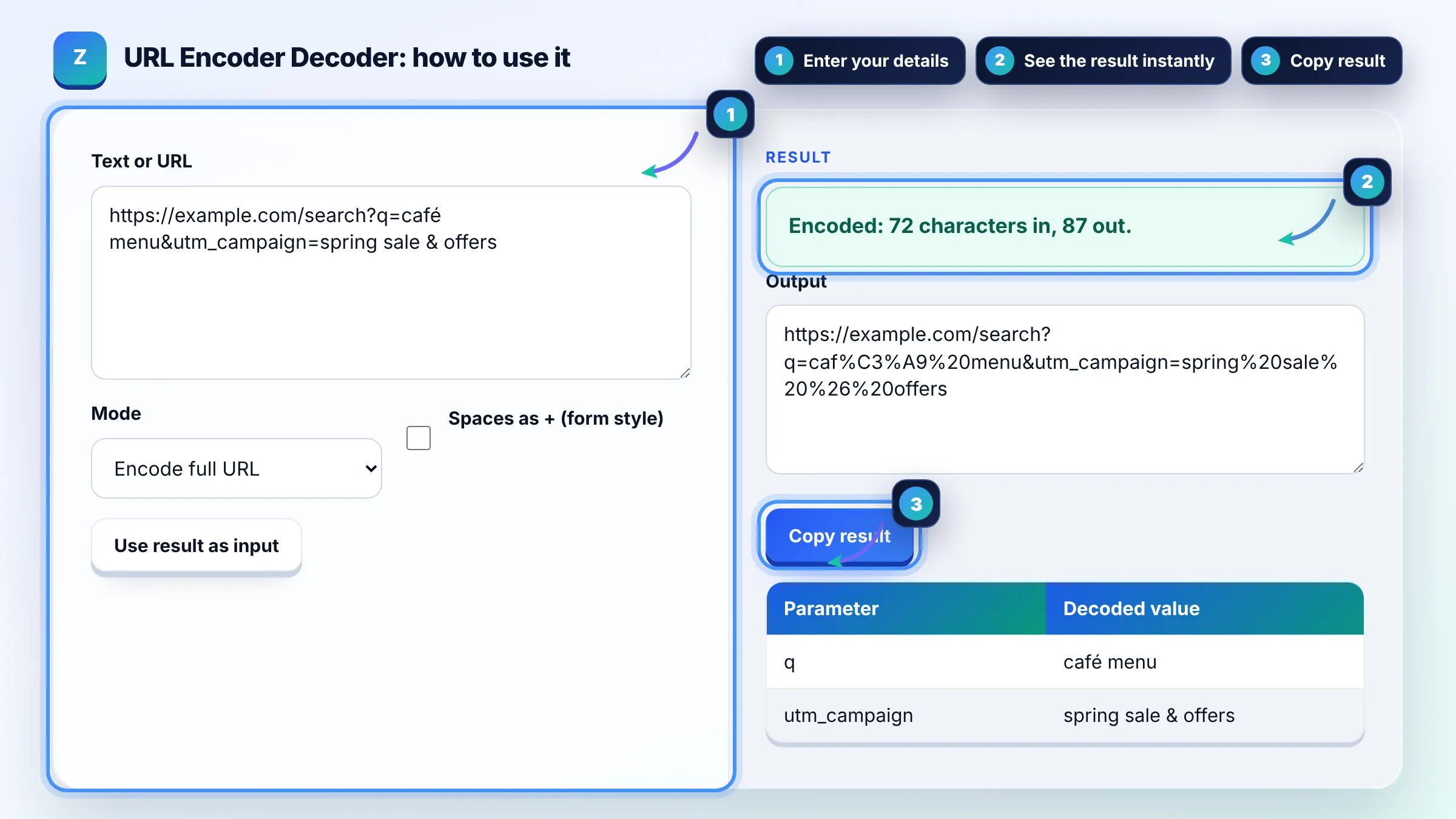
| Parameter | Decoded value |
|---|
The free url encoder decoder runs in your browser, needs no sign-up and never sends what you type anywhere.
This URL encoder decoder converts unsafe characters into percent codes such as %20 for a space and %C3%BC for u with umlaut, or turns them back into readable text. Rule of thumb: encode each query parameter value separately, and encode a full URL only once, because double encoding turns %20 into %2520.
A URL encoder decoder is a tool that applies percent encoding, where each byte of a character's UTF-8 form is written as % followed by two hex digits. Component mode escapes reserved characters like ? & = / #, while full URL mode keeps them so the address still works.
%20 is the percent encoded form of a space character, because spaces are not allowed in URLs. In HTML form data, spaces may also be written as +. MDN's percent encoding glossary lists the reserved characters and their codes.
Yes, in links and HTTP requests non-ASCII characters should be percent encoded as UTF-8 bytes, and browsers do this for you when you type them. Google's URL structure guidance shows examples such as gem%C3%BCse and recommends readable words in URLs, so the visible form can still be friendly.
encodeURI keeps characters that structure a URL, such as : / ? # & and =, so it is meant for a whole address. encodeURIComponent also escapes those characters, so it is meant for a single value inside a query string or path segment.
| Character | Encoded | Where it matters |
|---|---|---|
| Space | %20 (or + in forms) | Any part of a URL |
| & | %26 | Inside query values |
| = | %3D | Inside query values |
| ? | %3F | Inside paths and values |
| # | %23 | Anywhere not meant as a fragment |
| u with umlaut | %C3%BC | Non-ASCII text in URLs |
Example: a UTM campaign name "spring sale & offers" encoded as a value becomes spring%20sale%20%26%20offers, so the & no longer splits the query. Decoding https://example.com/?q=caf%C3%A9%20menu returns the parameter q with the value "café menu".
Double encoding happens when already encoded text is encoded again, so % becomes %25 and %20 turns into %2520. It breaks links and tracking. If you see %25 in a URL, decode it once and check whether the original was already encoded.
Decoding fails when a % sign is not followed by two valid hex digits, or when the bytes do not form valid UTF-8. The tool shows a friendly message instead of crashing. Encode a literal percent sign as %25.
Use %20 in paths and in most URLs. The + form is a convention for application/x-www-form-urlencoded data, mainly query strings from HTML forms. Many servers accept both in query strings, but only %20 is safe in a path.
Encoding itself does not hurt rankings, and Google handles percent encoded URLs. Problems come from inconsistent versions of the same URL, such as encoded and unencoded forms both being linked. Pick one form, link to it consistently and set a canonical.
Letters A to Z and a to z, digits 0 to 9, and the characters hyphen, period, underscore and tilde are unreserved and never need encoding. Using hyphens between words keeps URLs readable for people and search engines.
No. Encoding and decoding use the browser's built in functions, and nothing is sent to a server or stored. You can safely decode URLs that contain tracking IDs or tokens, but avoid sharing those URLs publicly.
Facts checked against these official pages. Read how I check facts in my editorial policy.
A UTM builder is a tool that appends tracking parameters to a landing page URL. It takes the base URL, keeps…
A slug generator is a tool that converts a page title into the last readable part of a URL. It lowercases the…
A Base64 encoder decoder is a tool that turns binary data into text using the characters A to Z, a to z, 0 to…
Send your website and I will check it for you, free.
One short email when something new goes live: articles, free SEO tools, package updates, discounts and price alerts. No spam, unsubscribe in one click.