
Local SEO
AI SEO for Local Businesses: Show Up in AI Answers
AI SEO for local businesses from Google's own docs: a complete Business Profile, genuine reviews, matching citations and clear service pages for…
Read article
This guide is for local business owners and marketers who want to know how many website visits, bookings and sales really come from their Google listing. You will learn how to track Google Business Profile clicks in Google Analytics 4 with UTM tags, where to find the numbers, and which actions only the profile itself can count.
To track Google Business Profile clicks in GA4, add UTM tags to the website and booking links in your profile, such as utm_source=google, utm_medium=organic and utm_campaign=gbp-listing. GA4 then shows those visits as their own campaign in Traffic acquisition. Calls and direction requests never reach your site, so check them in the profile Performance report.
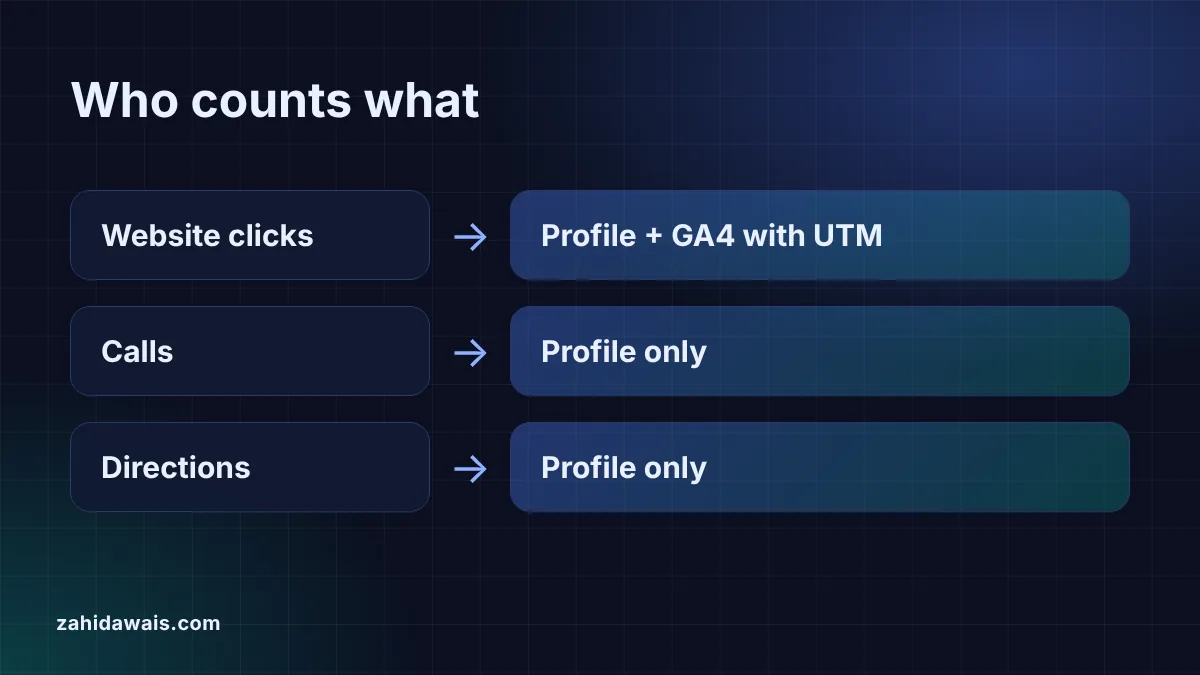
Your Business Profile has its own performance report that counts actions on the listing, before anyone reaches your website. Google’s help page on Business Profile performance defines website clicks as “the number of times people clicked on the website link on your Business Profile”, calls as “the number of times a customer clicked on the call button”, and directions as “how many people asked for directions to your business”. It also reports profile views, searches, messages and bookings.
A few details matter when you read it. Performance data is only available for verified profiles. Google says it “includes views, searches, and actions from both organic search results and Google Ads”, and that the searches metric is updated at the start of each month. For profile views, “a person can only be counted once a day”.
| Action on the profile | Counted in Business Profile | Visible in GA4 |
|---|---|---|
| Website button click | Yes, website clicks | Yes, as a session if the link is tagged |
| Booking or menu link | Bookings only via a booking provider | Yes, if you tag the link |
| Call button | Yes, calls | No, the visitor never reaches your site |
| Directions request | Yes, directions | No, it opens Google Maps |
| Directions link on your website | No | Yes, as an outbound click event |
| Profile view | Yes, once per person per day | No |
GA4 has no built in Business Profile channel, so an untagged click on your website button arrives like any other visit from Google. In reports it blends with ordinary search result clicks, and you cannot tell which sessions, leads or sales started on the listing. The profile report counts the click, but it stops there: it cannot tell you what the visitor did on your site.
UTM tags close that gap. They are parameters added to the end of a link, and GA4 reads them on the first page view. Google’s help page on collecting campaign data with custom URLs says “you should always use utm_source, utm_medium, and utm_campaign”, and warns that missing parameters “will result in (not set) values being present in reporting”.
Build one tagged link per button and paste it into the matching field of your profile. The GBP UTM link generator has presets for the website button, booking, menu, product and Google Posts links, and cleans the values for you. Then edit the profile, replace the plain website address with the tagged one, and save.
Use exactly the same spelling everywhere. Google says “parameter values are case sensitive, e.g. utm_source=google is different from utm_source=Google”, so one capital letter splits your data into two rows.
Open Reports, then Acquisition, then Traffic acquisition. Google describes it as a report “designed to help you understand where your website and app visitors are coming from”, and its default dimension is the session default channel group. Change the dimension to Session campaign and look for gbp-listing, or use Session source / medium and look for google / organic with a campaign filter.
With utm_medium=organic, GA4’s default channel group rules place these sessions in Organic Search, because one condition is that the medium “exactly matches organic”. That keeps your channel totals honest while the campaign name isolates the profile. For the full picture, see the Google Business Profile optimization guide.
Direction requests and calls made from the profile never touch your website, so only the profile performance report can count them. GA4 cannot. What GA4 can track is a directions link on your own site. If enhanced measurement is on, Google says outbound clicks are recorded as a click event “each time a user clicks a link that leads away from the current domain”.
The Google Maps directions link generator builds that link in the documented Maps URLs format, with your address and an optional place ID. Put it on your contact page and in booking emails, then look for click events with a link URL that starts with https://www.google.com/maps/dir/ in GA4. Phone links on your site can be tracked the same way as tel: clicks with a custom event if you need them.
They count different things, so expect a gap and track the trend, not an exact match. The profile counts clicks on the website link. GA4 counts sessions that start on your site, which only happen when the page loads and the Google tag runs, and only if the visitor allows analytics where consent is required.
Use each source for what it does well. The profile report shows demand on Google: views, searches, calls and direction requests. GA4 shows quality: engaged sessions, form fills and purchases from the gbp-listing campaign.
Example: a made-up clinic, Example Dental Clinic, with the site https://www.example.com/. The GBP UTM link generator, on its default website preset, gives https://www.example.com/?utm_source=google&utm_medium=organic&utm_campaign=gbp-listing&utm_content=website, a 106 character link with 4 UTM parameters. The appointment preset on https://www.example.com/book/ gives the same tags with utm_content=appointment. On the contact page, the directions link generator builds https://www.google.com/maps/dir/?api=1&destination=Example+Dental+Clinic%2C+1+Main+Street%2C+Springfield&travelmode=driving, 123 characters with 3 parameters. In GA4, both profile links appear under the gbp-listing campaign, split by utm_content.
UTM tags only add a query string that Google Analytics reads when a visitor lands. The page itself stays the same. Keep a canonical tag on the page that points to the clean URL, so the tagged address is not treated as a separate page.
Use organic if you want profile visits to stay in the Organic Search channel next to other unpaid Google traffic, and separate them by campaign. Use referral only if your team prefers to report the profile as a referrer. Stay consistent.
No. A tap on the call button dials your number straight from Google, so your website and GA4 never see it. The calls metric in the profile performance report counts those taps. Clicks on phone links on your own site can be tracked in GA4.
The two systems count different things. The profile counts clicks, while GA4 records a session only when the page loads, the tag runs and consent allows it. Ad blockers and quick back clicks also lower GA4 numbers. Track trends, not an exact match.
Keep utm_source=google and utm_medium=organic for every location, and add the location to the campaign or content value, such as gbp-listing-leeds. You can then compare locations and still filter all profile traffic with one search.
Sign in to the Google account that manages the profile, go to your Business Profile and click Performance, or in the Google Maps app tap Business. Data is only available for verified profiles, and you can pick a time period.
This guide is part of my Google Business Profile optimization guide.
Checked 23 Oct 2026. Facts checked against these official pages. Read how I check facts in my editorial policy.
Want calls and visits from Google Maps you can measure? See my local SEO service.
AI SEO for local businesses from Google's own docs: a complete Business Profile, genuine reviews, matching citations and clear service pages for…
Read article
How to make a Google review QR code, where to place it, what to write next to it, and which of Google's…
Read article
Seven ready-to-adapt replies for common complaints, with the structure that keeps every response short, calm and useful.
Read articleSend your website and I will reply with a free audit.