Character Counter
A character counter is a tool that counts every letter, number, space and symbol in a text. Characters with…
Paste an original and a changed version to see every added and removed word.
Left: original with removed text struck through in red. Right: changed text with additions underlined in green.
The free text compare runs in your browser, needs no sign-up and never sends what you type anywhere.
This text compare tool highlights the differences between two texts word by word or line by line, showing removed text in red on the left and added text in green on the right. Use word mode for edited copy and meta tags, and line mode for lists, robots.txt files and code.
A text compare tool, or diff checker, is a tool that finds the smallest set of additions and deletions that turns one text into another. It uses the longest common subsequence: words both versions share stay plain, and everything else is marked as removed or added.
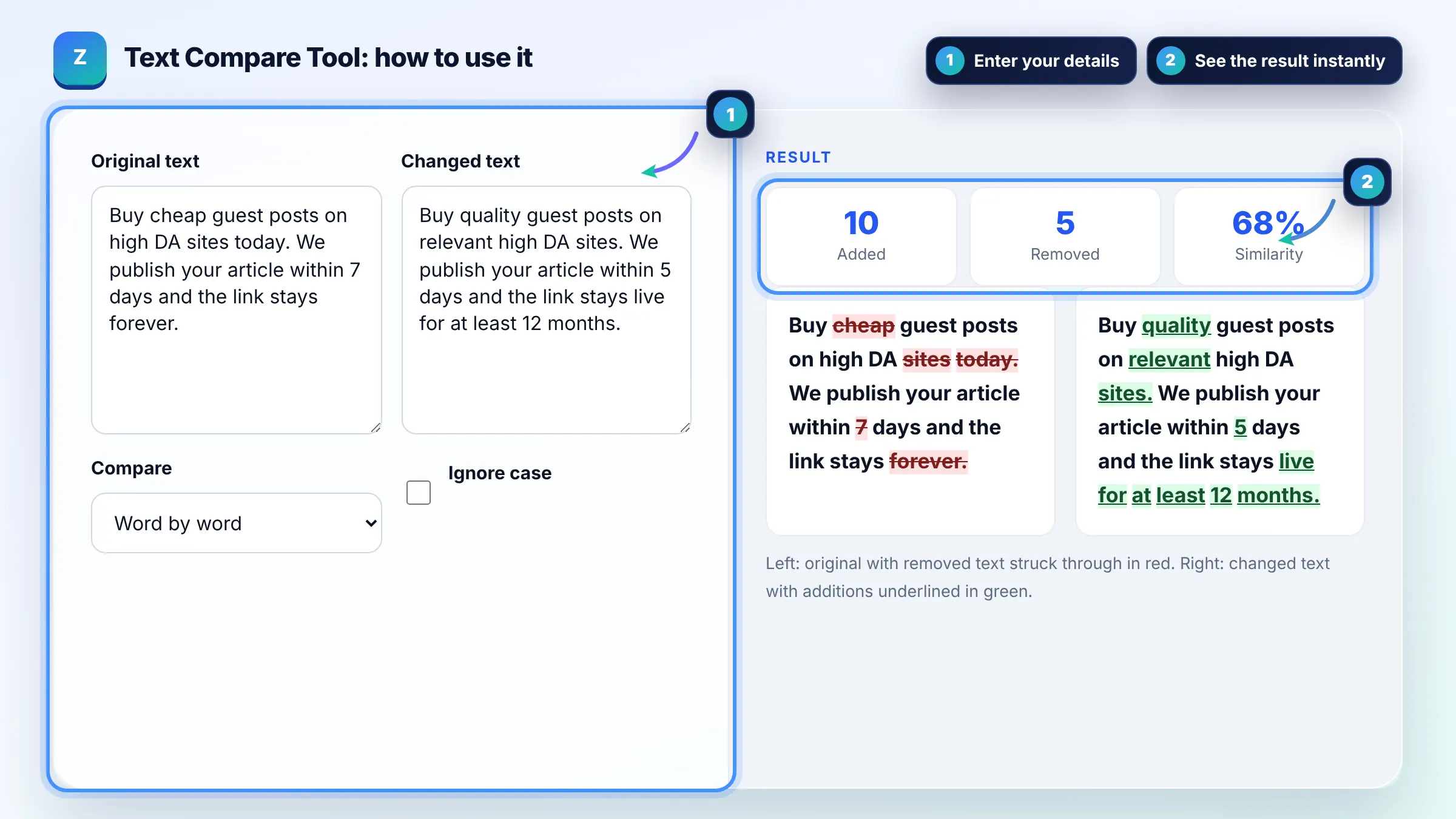
Paste the original in one box and the new version in the other, and the tool highlights every change. Removed words are struck through in red on the left and added words are underlined in green on the right, so you can review edits in seconds instead of reading both versions.
Yes, for two specific texts. A similarity score above about 80% means the pages are largely the same. Google's spam policies list lightly reworded copied content as scraped content, so pages need original value, not just swapped words.
Word comparison treats each word as a unit, which is best for prose, titles and meta descriptions. Line comparison treats each line as a unit, which is best for lists, code, robots.txt and sitemap URL lists where one changed line matters.
| Use case | Mode | What to look for |
|---|---|---|
| Edited blog post | Words | Removed facts and added claims |
| Title and meta description tests | Words | Keyword moved or dropped |
| robots.txt before and after | Lines | New Disallow rules |
| URL or keyword lists | Lines | Added and removed items |
| Writer or AI rewrite vs source | Words | Similarity above 80% means too close |
Example: the original meta description "Buy cheap guest posts on high DA sites today" and the new one "Buy quality guest posts on relevant high DA sites" share 7 words. The tool marks "cheap" and "today" as removed and "quality" and "relevant" as added, a similarity of 2 x 7 / (9 + 9) = 78%.
Similarity is twice the number of unchanged words or lines divided by the total in both texts, times 100. Two identical texts score 100% and two texts with nothing in common score 0%. Ignore case raises the score when only capitalization changed.
The tool compares up to about 2,000 changed words or lines per side after skipping the identical start and end of both texts. That covers long articles. For very large files, compare one section at a time.
A moved block shows as removed in its old place and added in its new place, because the comparison follows the order of the text. If a large section appears both removed and added, it was probably moved rather than rewritten.
Yes. Use line mode for code, configuration files and robots.txt files, so each changed line is highlighted. Spaces inside a line are compared exactly in line mode, so an indentation change marks the line as changed.
Punctuation is attached to the word it touches, so changing "sites" to "sites." marks the whole word as removed and added. This keeps the output readable and still shows you exactly where the edit happened.
No. The comparison runs in your browser with JavaScript. Neither text is uploaded, stored or logged, so you can safely compare contracts, client drafts and unpublished content.
Facts checked against these official pages. Read how I check facts in my editorial policy.
A character counter is a tool that counts every letter, number, space and symbol in a text. Characters with…
A word frequency counter is a tool that counts how many times each word or phrase appears in a text. Density…
A remove duplicate lines tool is a list cleaner that keeps only the first occurrence of each line. It…
Send your website and I will check it for you, free.
One short email when something new goes live: articles, free SEO tools, package updates, discounts and price alerts. No spam, unsubscribe in one click.