Title Tag Pixel Width Checker
A title pixel width checker is a tool that measures how wide a title tag renders in pixels rather than…
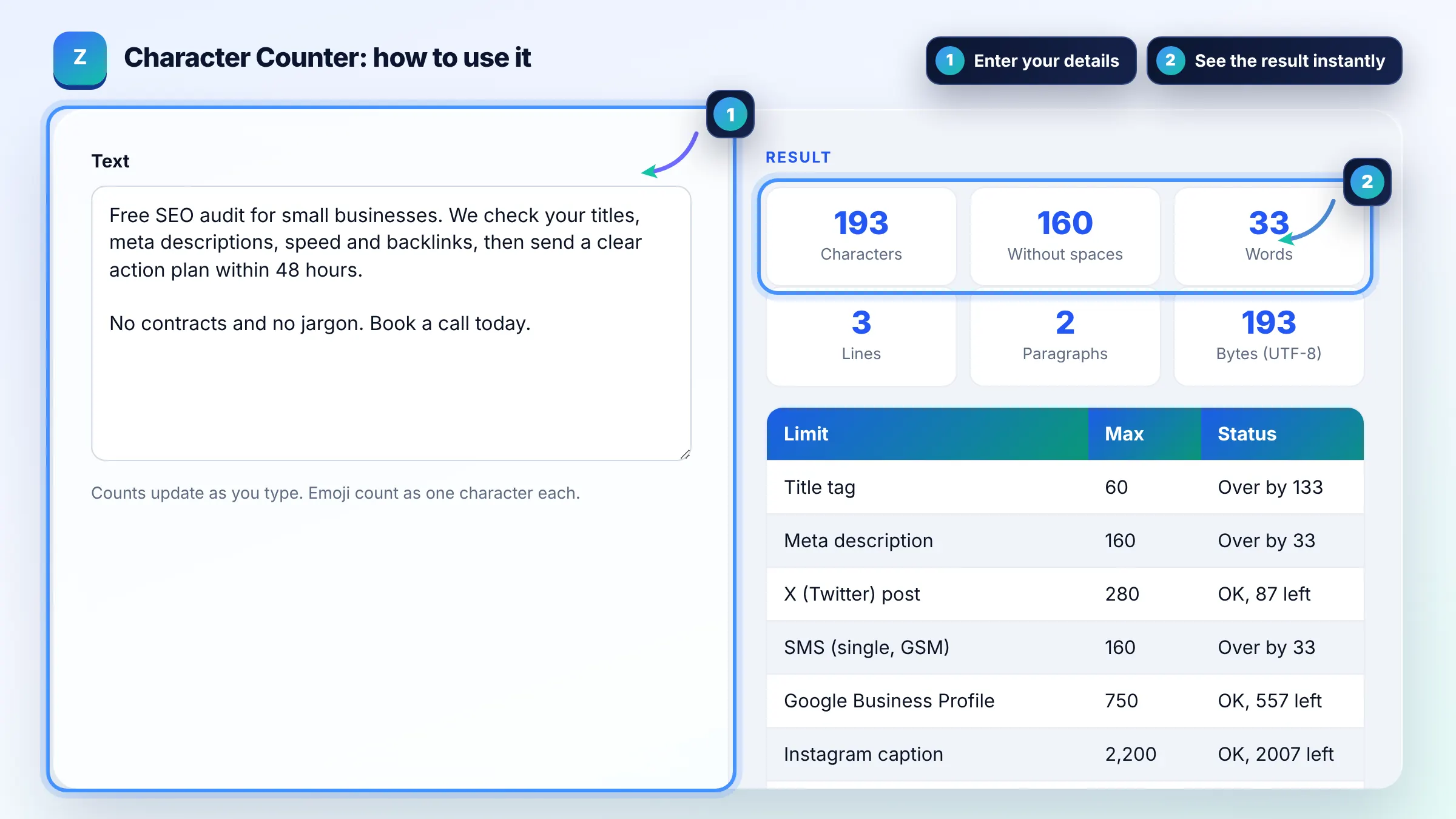
Count characters, words and lines as you type, and check limits for SEO and social posts.
Counts update as you type. Emoji count as one character each.
| Limit | Max | Status |
|---|
SEO limits are guidelines (Google truncates by pixel width). Social limits are the platform maximums; X counts links and some characters differently, so treat it as an estimate.
The free character counter runs in your browser, needs no sign-up and never sends what you type anywhere.
This character counter counts characters with and without spaces, words, lines, paragraphs and bytes as you type. Rule of thumb for SEO: keep title tags around 50 to 60 characters and meta descriptions around 150 to 160, because Google truncates longer ones by pixel width. X posts allow 280 characters.
A character counter is a tool that counts every letter, number, space and symbol in a text. Characters with spaces is the total length, characters without spaces removes all whitespace, and this tool counts emoji as one character each.
Keep title tags to about 50 to 60 characters so most of them show in full on desktop. Google has no fixed character limit and truncates titles to fit the device width, as its title link guide explains, so wide letters like W and M use up space faster.
Aim for about 150 to 160 characters for a meta description. Google says there is no limit on its length, but it shortens snippets to fit the screen, so put the most useful words first. Google may also write its own snippet from the page text.
Yes, spaces count as characters on almost every platform, including X, Instagram, LinkedIn, title tags and SMS. That is why this tool shows both counts. Characters without spaces is mainly used for translation pricing and some academic word limits.
| Where | Character limit | Note |
|---|---|---|
| Title tag | About 50 to 60 | Guideline; Google truncates by pixel width |
| Meta description | About 150 to 160 | Guideline; no official limit |
| X (Twitter) post | 280 | Links count as 23; some characters count double |
| Instagram caption | 2,200 | Only the first lines show before "more" |
| LinkedIn post | 3,000 | About 210 show before "see more" |
| Google Business Profile description | 750 | First 250 or so show first |
Example: the meta description "Free character counter. Count characters, words and lines, and check limits for title tags, meta descriptions and social posts in seconds." has 138 characters with spaces and 118 without, so it fits the 150 to 160 guideline with room for a call to action.
Each emoji counts as one character here, the way people see it. Some systems count differently: JavaScript string length counts many emoji as two code units, and X counts most emoji as two characters. Check the platform rule if you are close to a limit.
Characters are the symbols you see. Bytes are how much storage the text needs in UTF-8 encoding. English letters use 1 byte each, accented letters usually use 2 and emoji use 4, so bytes matter for database fields and SMS.
A single SMS holds 160 characters using the standard GSM alphabet, or 70 characters if it contains emoji or other Unicode symbols. Longer messages are split into parts, which can cost more to send.
Google truncates titles and snippets to fit the device width, which works out closer to pixels than characters. Character guidelines like 60 for titles are a practical shortcut. Use a pixel width checker if a title is borderline.
Lines are counted by line breaks, so a text with three line breaks has four lines. Paragraphs are blocks of text separated by one or more empty lines. Empty lines are not counted as paragraphs.
Yes. Counting happens in your browser with JavaScript and nothing you type is uploaded or saved. You can safely paste drafts, client copy or private notes.
Facts checked against these official pages. Read how I check facts in my editorial policy.
A title pixel width checker is a tool that measures how wide a title tag renders in pixels rather than…
A meta description length checker is a tool that measures a description in characters and in rendered pixels.…
An Instagram caption character counter is a tool that counts every character in a caption, including spaces,…
Send your website and I will check it for you, free.
One short email when something new goes live: articles, free SEO tools, package updates, discounts and price alerts. No spam, unsubscribe in one click.