Facebook Post Preview
A Facebook post preview is a mockup of how a post may look in the news feed before you publish it. This tool…
Count caption characters and hashtags and see the first lines people read.
Feed post style
Approximate preview with a generic look. Feeds usually show about 2 lines of caption before more; the exact cut depends on the device.
The free instagram caption character counter runs in your browser, needs no sign-up and never sends what you type anywhere.
This Instagram caption character counter checks your caption against the 2,200 character limit, counts hashtags and mentions, and previews the feed view where only about 2 lines show before more. Put the hook in the first 125 characters, and keep hashtags within the limit your app allows, now 5 for many accounts.
An Instagram caption character counter is a tool that counts every character in a caption, including spaces, emoji and line breaks, against the 2,200 character maximum. It also counts hashtags and @ mentions and wraps the caption into a feed style card to show the visible first lines.
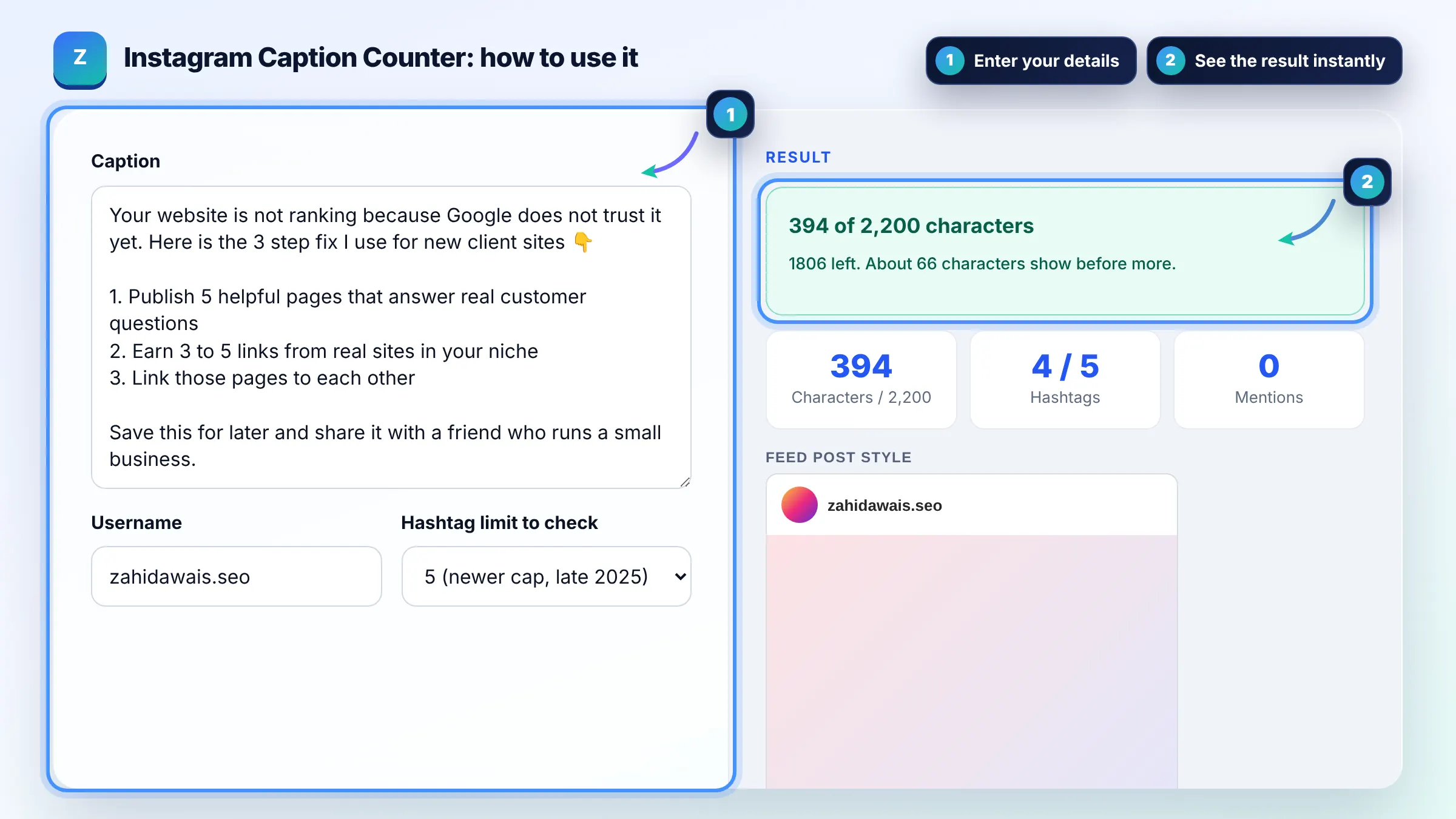
Instagram captions can be up to 2,200 characters, including spaces, emoji, line breaks and hashtags. In the feed only about the first 125 characters, roughly 2 lines, show before the more link, so the opening line matters most.
For years the limit was 30 hashtags per post, and in late 2025 Instagram began capping posts at 5 hashtags. Check what your app allows before posting. Either way, a few specific, relevant hashtags help more than a long list. See the Instagram Help Center for hashtag basics.
Yes. Every emoji, space and line break counts toward the 2,200 limit. Most emoji count as one visible character in this tool, though some combined emoji, like family or skin tone variants, are built from several parts and may count as more.
| Item | Limit | Tip |
|---|---|---|
| Caption length | 2,200 characters | Hook in first 125 |
| Visible before more | About 2 lines | Lead with the benefit |
| Hashtags | 5 (newer cap) or 30 (older limit) | Use specific tags |
| @ mentions | About 20 commonly reported | Tag only relevant accounts |
| Bio | 150 characters | Put your link in the bio |
Example: the default caption is about 390 characters with 4 hashtags and no mentions. It passes the 2,200 limit and the 5 hashtag cap. In the feed preview only the first sentence, about 65 characters, shows before more, so the promise of "the 3 step fix" needs to move into that first line.
No. It is an approximate preview with a generic look. Instagram uses different fonts and widths on each phone and changes the layout over time, so the cut point can move by a few words. Use it to judge your opening line.
Most creators put hashtags at the end of the caption, after a line break, so the message reads cleanly. Hashtags work the same in the caption or at the end. Choose a few relevant tags rather than a long block.
No. URLs in captions are shown as plain text and cannot be tapped. Use the link in your bio, a link sticker in Stories or a product tag instead, and tell readers where to find the link in the caption.
No. The counter and preview run only in your browser. Your caption is never uploaded or stored, so you can draft client posts or unreleased campaigns safely.
There is no single best length. Short captions under 125 characters show in full, while longer educational captions can work well when the first line makes people tap more. Test both and compare saves and shares in your insights.
Common reasons are going over 2,200 characters, using more hashtags than your account allows, too many mentions, or banned hashtags. Remove extra hashtags and mentions first, since those are the most frequent cause.
Facts checked against these official pages. Read how I check facts in my editorial policy.
A Facebook post preview is a mockup of how a post may look in the news feed before you publish it. This tool…
A character counter is a tool that counts every letter, number, space and symbol in a text. Characters with…
A TikTok caption character counter is a tool that counts the characters, hashtags and mentions in a TikTok…
Send your website and I will check it for you, free.
One short email when something new goes live: articles, free SEO tools, package updates, discounts and price alerts. No spam, unsubscribe in one click.