Open Graph Preview
An open graph preview is a mockup of the link card social platforms build from your Open Graph meta tags. The…
Preview your post on desktop and mobile and see where See more hides your text.
Desktop feed style
Mobile feed style
Approximate preview. The See more cut is an estimate (about 5 lines on desktop, 3 lines on mobile). Facebook changes its feed layout and may show short posts in larger text.
The free facebook post preview runs in your browser, needs no sign-up and never sends what you type anywhere.
This Facebook post preview shows an approximate desktop and mobile feed post and estimates where the See more link cuts your text. Mobile feeds often show only about 3 lines, roughly 100 to 150 characters, so put your hook and key message in the first line and keep the call to action visible.
A Facebook post preview is a mockup of how a post may look in the news feed before you publish it. This tool wraps your text in a 500 px desktop card and a 340 px mobile card, cuts it after about 5 and 3 lines, and counts how many characters stay visible.
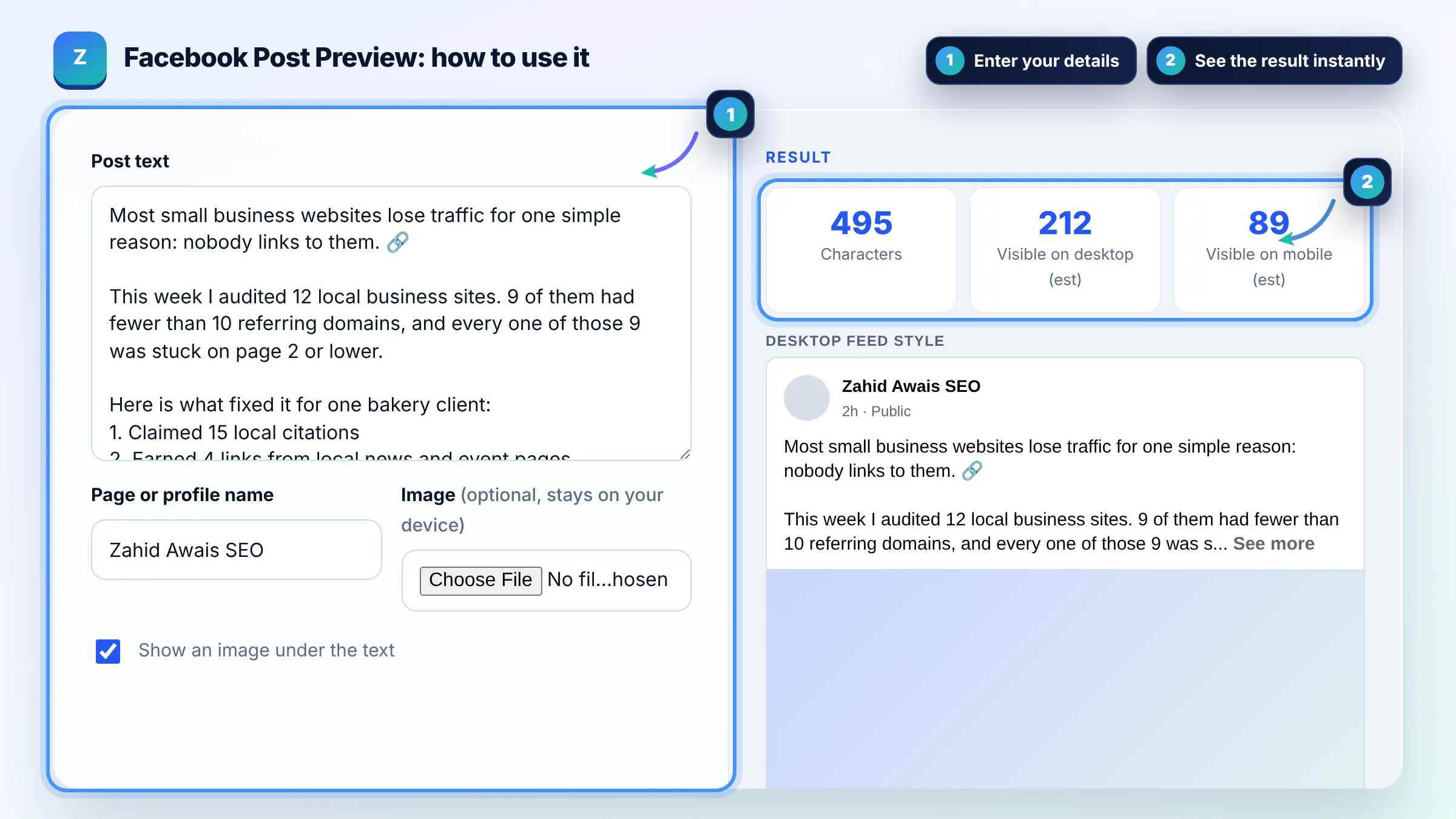
On mobile, usually about 3 lines show, roughly 100 to 150 characters depending on line breaks and emoji. Desktop feeds often show about 5 lines. Facebook does not publish an exact number and line breaks count as full lines, so short opening lines keep more visible.
The commonly cited limit for a Facebook post is 63,206 characters, which almost no post reaches. The real limit that matters is attention: only the first few lines show before See more, so long posts need a strong opening.
The link card is built from the Open Graph tags of the page you link to: og:title, og:description, og:image and og:url. Set those tags on your page, and see Meta sharing guidance for webmasters for the details.
| Part of the post | Approximate visible amount | Tip |
|---|---|---|
| Mobile text before See more | About 3 lines, 100 to 150 characters | Hook in the first line |
| Desktop text before See more | About 5 lines, 300 to 450 characters | Key point in first 2 lines |
| Line breaks | Each counts as a full line | Avoid blank lines at the start |
| Image in feed | Square or 1.91:1 crops are common | Keep text away from edges |
| Hashtags | Shown as links | Use 1 to 3 relevant ones |
Example: the default post is about 500 characters with several line breaks. In the mobile preview only the first line, about 90 characters, shows before See more, and on desktop about 220. Readers see the hook about lost traffic but not the bakery result, so moving "map pack in 7 weeks" into the first line puts the proof above the cut.
No. It is an approximate preview with a generic look. Facebook uses its own fonts and layouts, tests different designs and may show short text only posts in large type. Use the cut point as a guide when you write.
Yes. Each line break starts a new line, so a post with many short lines reaches the line limit faster than a dense paragraph. Use breaks for readability but keep the first two lines meaningful.
No. Everything runs in your browser. The image is read from your device only to draw the preview, and your text is never sent or stored anywhere.
Yes. Each emoji counts toward the length and takes up about the width of one or two letters in the feed. The tool counts each emoji as one character, which is close to what you see.
Usually not. A raw link in the opening line takes space from your hook. Most marketers place the link after the main message or let the link preview card do the work, which uses the linked page Open Graph tags.
There is no single best length. Short posts under about 100 characters show fully everywhere, while longer story posts can work if the first line earns the See more click. Test both and compare reach and engagement in your insights.
Facts checked against these official pages. Read how I check facts in my editorial policy.
An open graph preview is a mockup of the link card social platforms build from your Open Graph meta tags. The…
A LinkedIn post preview is a mockup of how a text post may look in the LinkedIn feed before you publish. The…
A character counter is a tool that counts every letter, number, space and symbol in a text. Characters with…
Send your website and I will check it for you, free.
One short email when something new goes live: articles, free SEO tools, package updates, discounts and price alerts. No spam, unsubscribe in one click.