Disavow File Generator
A disavow file generator is a tool that cleans a pasted list of links into the plain text format Google…
Paste a keyword or URL list and get a clean, unique, sorted list in one step.
The free remove duplicate lines runs in your browser, needs no sign-up and never sends what you type anywhere.
This tool removes duplicate lines from any list in your browser, keeping the first copy of each line. For keyword and URL lists, tick ignore case and trim spaces so that "SEO Tools" and "seo tools " count as the same line, and normalize URLs to treat http, https and trailing slashes as duplicates.
A remove duplicate lines tool is a list cleaner that keeps only the first occurrence of each line. It compares lines after optional clean up, such as lowercasing or trimming, so near identical lines are also treated as duplicates.
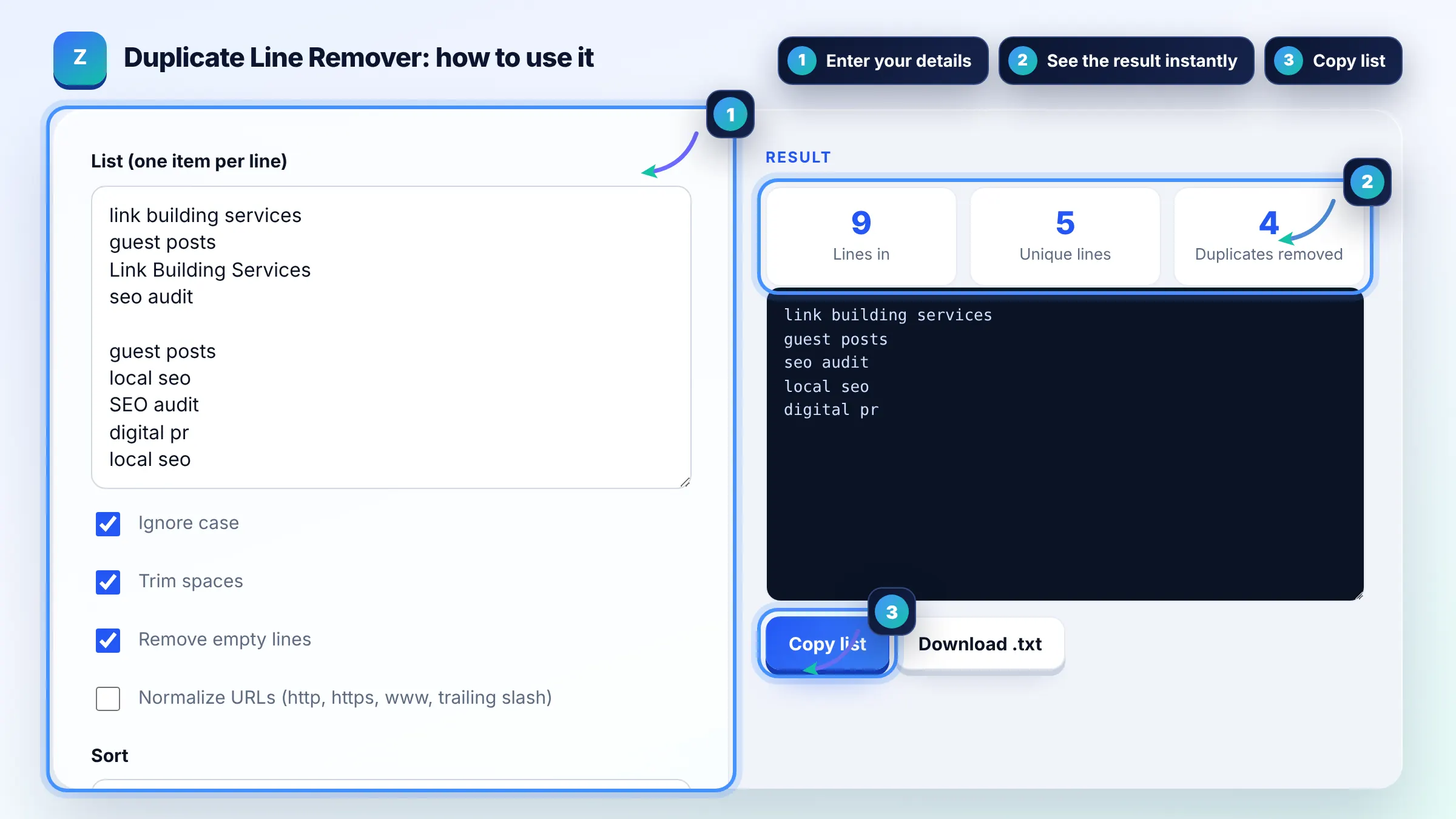
Paste the keywords one per line, tick Ignore case and Trim spaces, and the tool keeps one copy of each keyword. A list exported from several keyword tools often shrinks by 20 to 40% because the same terms appear in each export with different capitalization.
Tick Normalize URLs so http and https versions, www and non www hosts and trailing slashes count as one URL. Then pick the version you want to keep on the live site. Google's canonical URL guide recommends listing only canonical URLs in sitemaps.
No, not unless you choose a sort order. By default the tool keeps the first occurrence of each line in its original position and drops later copies, so a prioritized list keeps its priority.
| Option | Treats as duplicates | Best for |
|---|---|---|
| Ignore case | SEO Tools and seo tools | Keyword lists |
| Trim spaces | "guest posts" and " guest posts " | Lists pasted from spreadsheets |
| Remove empty lines | All blank lines are removed | Any list |
| Normalize URLs | http://site.com/page and https://www.site.com/page/ | URL, sitemap and disavow lists |
| Sort A to Z | Not a duplicate rule; sorts the result | Easy review and comparison |
Example: you combine three keyword exports into one list of 1,250 lines. With Ignore case, Trim spaces and Remove empty lines ticked, the tool finds 410 duplicates and 15 blank lines, leaving 825 unique keywords ready to sort A to Z and import into your tracker.
The first occurrence is kept exactly as you typed it, including its capitalization, and every later duplicate is removed. If you need a specific version kept, move it to the top of the list before cleaning.
For comparison only, it lowercases the host, removes http or https, removes a leading www and ignores a trailing slash and a # fragment. The original URL of the first occurrence is kept in the output, so nothing in your list is rewritten.
Yes. Choose Shortest first or Longest first in the sort menu. Sorting by length is useful for keyword lists, because short head terms rise to the top and long tail phrases group together at the end.
It handles tens of thousands of lines in a modern browser, because each line is checked once against a lookup table. Very large lists of several hundred thousand lines may take a second or two on slower phones.
Yes. Paste the domain: and URL lines, remove duplicates and download the result as a .txt file. Review the list by hand before uploading it, because disavowing good links can hurt rankings.
No. The list is processed by JavaScript in your browser, and the download is created on your device. Keyword, client and URL lists never leave your computer.
Facts checked against these official pages. Read how I check facts in my editorial policy.
A disavow file generator is a tool that cleans a pasted list of links into the plain text format Google…
A sitemap generator from a URL list is a tool that wraps each URL in the loc element of the sitemaps.org XML…
A remove line breaks tool is a text cleaner that replaces the newline characters inside your text with a…
Send your website and I will check it for you, free.
One short email when something new goes live: articles, free SEO tools, package updates, discounts and price alerts. No spam, unsubscribe in one click.