Sitemap XML Validator
A sitemap validator is a tool that parses sitemap XML and checks it against the sitemap protocol and Google's…
Paste the XML of a sitemap or sitemap index and get every URL with its lastmod date, plus duplicates and risky URLs flagged.
This page cannot download a sitemap for you: browsers block reading other sites (CORS). Open the sitemap address in a new tab, view the page source, copy all of it and paste it here. Gzip (.gz) files are not supported, so unzip them first.
| # | URL | lastmod | Flags |
|---|
The free sitemap URL extractor turns the XML of a sitemap or sitemap index into a clean list of URLs with their lastmod dates. It also flags duplicates, http URLs, URLs on another host and badly formatted dates, and it runs entirely in your browser.
A sitemap URL extractor reads the loc and lastmod values from sitemap XML and gives you a plain list or CSV of every URL. Paste the XML source, because browsers cannot fetch other sites. The tool also flags duplicates, http URLs and URLs on another host, which Google may reject.
A sitemap URL extractor is a tool that pulls the page addresses out of an XML sitemap so you can work with them as a list. Every page in a sitemap sits inside a <url> element with a required <loc> and an optional <lastmod>. A sitemap index uses <sitemap> elements instead, one per child sitemap. This tool reads both, using a real XML parser rather than a text search, so it copes with namespace prefixes and skips image, video and news extension tags while still counting them.
A clean list is useful for audits: paste it into a crawler, compare it with the URLs Search Console reports, or check which old pages are still listed. Google says to "use fully-qualified, absolute URLs" because it will try to crawl them "exactly as listed", so the flags help you spot entries that waste that crawl. To check the structure of the file itself, use the sitemap XML validator.
Because browsers block a web page from reading files on another site unless that site allows it, a rule called cross-origin resource sharing (CORS). Most sites do not allow it for their sitemaps, so a browser tool would fail or need a server in between. Pasting the source keeps everything on your device and works for any site, including staging sites behind a login.
URLs that are duplicated, use a different protocol or sit on a different host are the usual problems. The sitemaps.org protocol says all URLs in a sitemap must come from a single host and use the same protocol as the sitemap location. Search Console reports a "URL not allowed" error when a sitemap includes URLs "at a higher level or different domain than the sitemap file". Duplicates are not an error, but they add noise and usually point to a plugin or export problem.
Yes. It lists the page URL of each entry and counts the extension tags inside it, such as image:image, video:video, news:news and hreflang xhtml:link elements. Image URLs inside image:loc are not mixed into the page list, because they are not pages. Google's image sitemap documentation allows up to 1,000 image:image tags in one url entry.
| Flag | What it means | What to do |
|---|---|---|
| duplicate | The same loc appears more than once | Remove the repeat at the source (plugin or export) |
| not https | The URL starts with http:// | List the https version if the site redirects to it |
| other host | Host differs from the sitemap address | Move it to that host's own sitemap |
| bad lastmod | Date is not in W3C Datetime format | Use YYYY-MM-DD or a full date and time |
| 2,048+ characters | loc is too long for the protocol | Shorten the URL or leave it out |
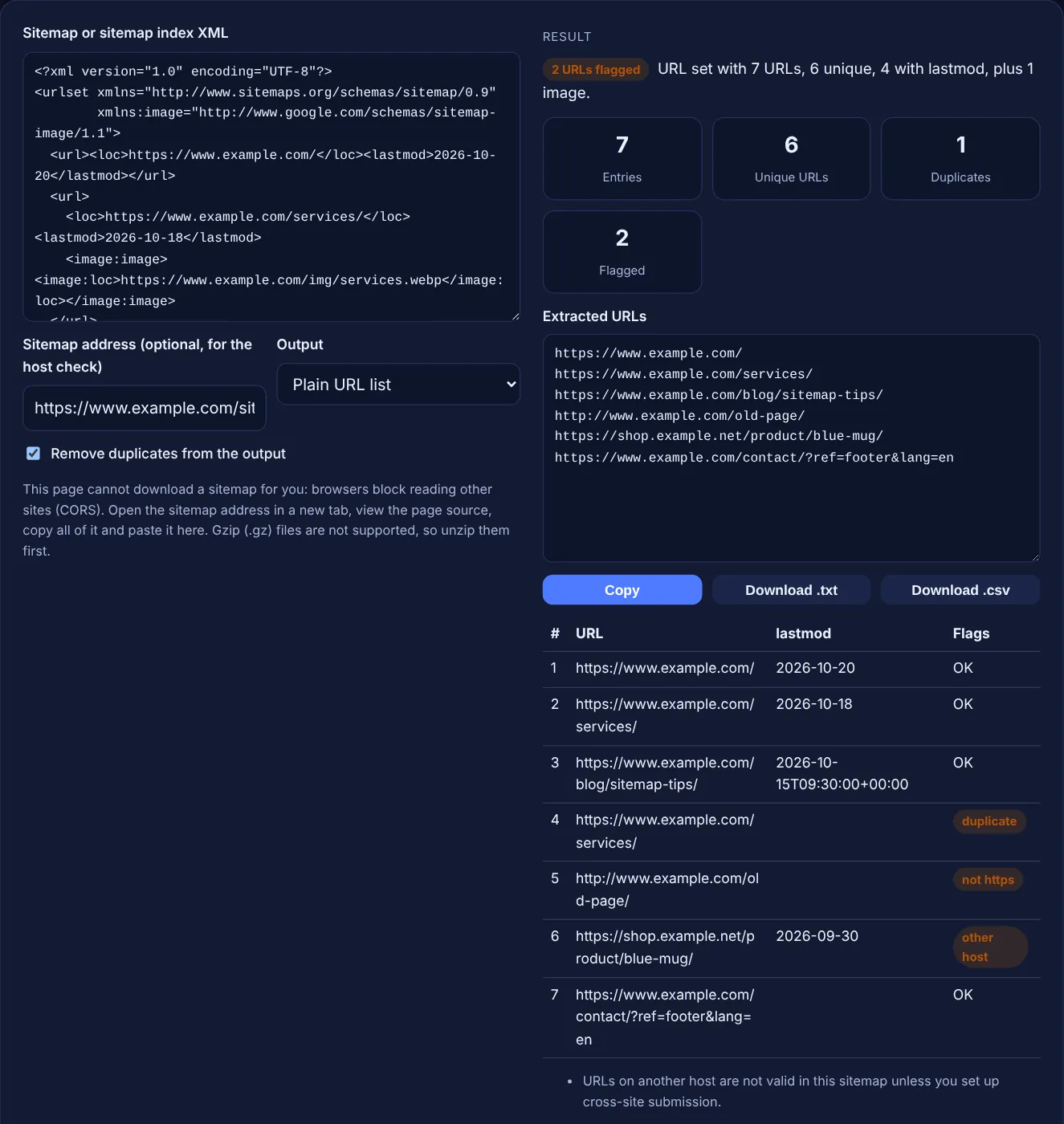
Example: the default sample is a sitemap for www.example.com with 7 <url> entries. The extractor finds 6 unique URLs because /services/ is listed twice. It flags 2 URLs: http://www.example.com/old-page/ (not https) and https://shop.example.net/product/blue-mug/ (other host). 4 entries have a lastmod date, and 1 image tag is counted but kept out of the URL list. The escaped & in the contact URL comes out as a normal &.
Open the sitemap address in your browser, then use View page source or press Ctrl+U. Select everything and copy it. Some sites style sitemaps with XSL, so the source view is the reliable way to get the raw XML.
Yes. The tool detects a sitemapindex root and lists the child sitemap addresses with their lastmod dates. To get the page URLs, open each child sitemap, copy its source and paste it in turn.
A .gz file is compressed binary data, and pasted text cannot carry it intact. Download the file, unzip it with any archive tool, open the XML in a text editor and paste the contents here.
No. The XML is parsed by your own browser with its built in DOMParser, and the download buttons create files on your device. Nothing is sent to a server or stored.
Sitemaps.org says lastmod should use the W3C Datetime format, which allows a plain date such as 2026-10-20 or a full date and time with a time zone. Google says it should reflect the last significant update of the page.
It handles tens of thousands of entries in a modern browser. The table shows the first 500 rows to stay fast, while the output box and downloads include every URL found in the pasted XML.
Checked 23 Oct 2026. Facts checked against these official pages. Read how I check facts in my editorial policy.
A sitemap validator is a tool that parses sitemap XML and checks it against the sitemap protocol and Google's…
A sitemap index generator is a tool that wraps each sitemap URL in a sitemap element with a loc and optional…
Splits a URL list or sitemap into files under 50,000 URLs and 50MB, plus a sitemap index.
A URL parser is a tool that reads a URL according to the URL standard and separates it into components. This…
Send your website and I will check it for you, free.
One short email when something new goes live: articles, free SEO tools, package updates, discounts and price alerts. No spam, unsubscribe in one click.