Robots.txt Generator
A robots.txt generator is a tool that writes the plain text file crawlers read at the root of your site…
Build a valid RFC 9116 security.txt so researchers know how to report vulnerabilities to you.
The free security txt generator runs in your browser, needs no sign-up and never sends what you type anywhere.
This security.txt generator builds the plain text file that tells security researchers how to report vulnerabilities on your site. Rule of thumb: include at least one Contact and exactly one Expires date less than a year ahead, serve it at /.well-known/security.txt over HTTPS, and link your disclosure policy.
A security.txt generator is a tool that writes the machine readable file defined in RFC 9116, listing fields such as Contact, Expires, Encryption, Policy and Preferred-Languages. It formats each contact as a mailto:, https: or tel: URI, writes Expires as an RFC 3339 timestamp and validates that required fields exist and links use HTTPS.
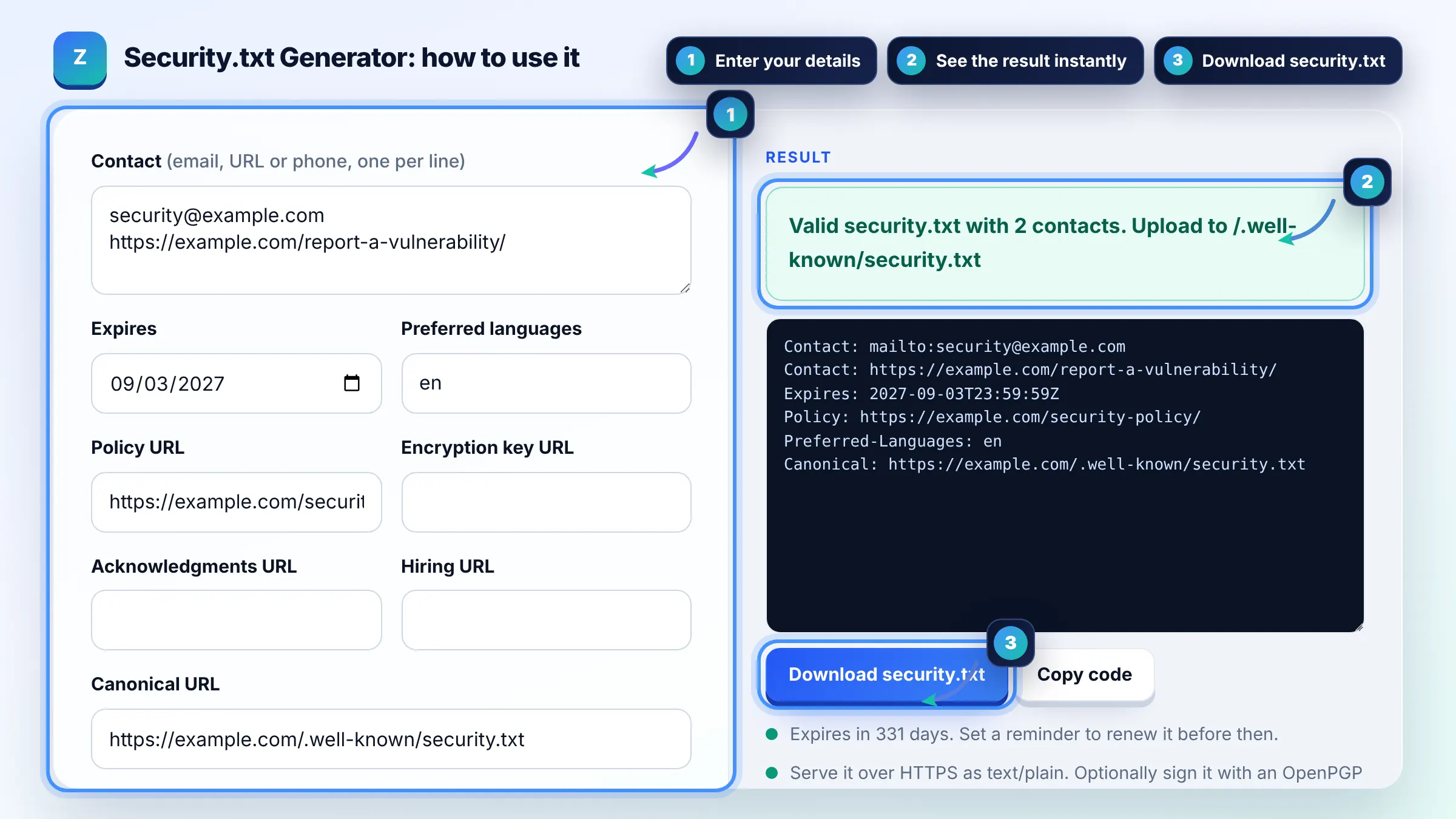
Place it at /.well-known/security.txt on your domain, served over HTTPS as text/plain. A copy at the root path /security.txt is allowed for legacy reasons, but the /.well-known/ version takes precedence. The rules are in RFC 9116.
Only 2 fields are required: Contact, which can appear several times, and Expires, which must appear exactly once. Everything else, such as Encryption, Policy, Acknowledgments, Canonical, Hiring and Preferred-Languages, is optional but helpful to researchers.
Set Expires less than 1 year in the future, as RFC 9116 recommends, so the file never shows stale contacts. A date 6 to 11 months ahead is common. Researchers may treat an expired file as untrustworthy, so update it before the date passes.
| Field | Required? | Example |
|---|---|---|
| Contact | Yes, one or more | mailto:security@example.com |
| Expires | Yes, exactly once | 2027-09-30T23:59:59Z |
| Encryption | Optional | https://example.com/pgp-key.txt |
| Policy | Optional | https://example.com/security-policy/ |
| Preferred-Languages | Optional, once | en, de |
| Canonical | Optional | https://example.com/.well-known/security.txt |
Example: a small agency enters security@example.com and a report form at https://example.com/report/, sets Expires to 11 months ahead and links its policy. The tool writes 2 Contact lines (mailto: and https:), 1 Expires line in UTC, a Policy line, Preferred-Languages: en and a Canonical line, under 300 bytes in total.
Not directly. Search engines do not rank pages higher for having security.txt. It is a trust and security practice: it gives researchers a clear route to report problems before attackers find them, which protects your site, your users and indirectly your rankings.
Signing is optional but recommended by RFC 9116. A digital signature lets researchers confirm the file was not altered. If you sign it, add a Canonical field first, then create an OpenPGP cleartext signature over the final file.
Yes. Contact can be an https URL to a report form, a mailto: email address or a tel: phone number. List them in order of preference, because the first Contact is treated as the preferred way to reach you.
Serve it as text/plain with UTF-8 charset over HTTPS. Most servers do this automatically for .txt files. If your CMS returns an HTML page or a redirect to the home page at that path, researchers and scanners will not read it.
WordPress has no built in security.txt, but you can upload the file to a .well-known folder in your site root with FTP or your hosting file manager. Some security plugins can also create it. Check the URL loads after uploading.
No. The file is built entirely in your browser with JavaScript, and nothing is stored or uploaded. Only the file you publish on your own domain is public, so use a team address such as security@ rather than a personal one.
Facts checked against these official pages. Read how I check facts in my editorial policy.
A robots.txt generator is a tool that writes the plain text file crawlers read at the root of your site…
An ads.txt generator is a tool that writes and checks the plain text file defined by the IAB Tech Lab ads.txt…
An htaccess generator is a tool that writes per directory Apache configuration so you do not have to remember…
Send your website and I will check it for you, free.
One short email when something new goes live: articles, free SEO tools, package updates, discounts and price alerts. No spam, unsubscribe in one click.