HTML Minifier
An HTML minifier is a tool that rewrites markup into fewer bytes without changing what the browser renders.…
Paste Markdown and get clean, safe HTML with a live preview, right in your browser.
Raw HTML inside the Markdown is escaped, not rendered, so the output is safe to paste into a CMS.
Live preview
The free markdown to html runs in your browser, needs no sign-up and never sends what you type anywhere.
A Markdown to HTML converter turns plain text formatting into HTML tags: ## becomes h2, **bold** becomes strong, [text](url) becomes a link and pipe tables become table markup. This tool follows common CommonMark and GitHub Flavored Markdown rules, escapes raw HTML for safety, and shows a live preview before you copy the code.
A Markdown to HTML converter is a tool that parses Markdown syntax and outputs matching HTML elements. It reads the text block by block (headings, lists, quotes, tables, code fences, paragraphs), then converts inline syntax such as emphasis, code spans, links and images inside each block.
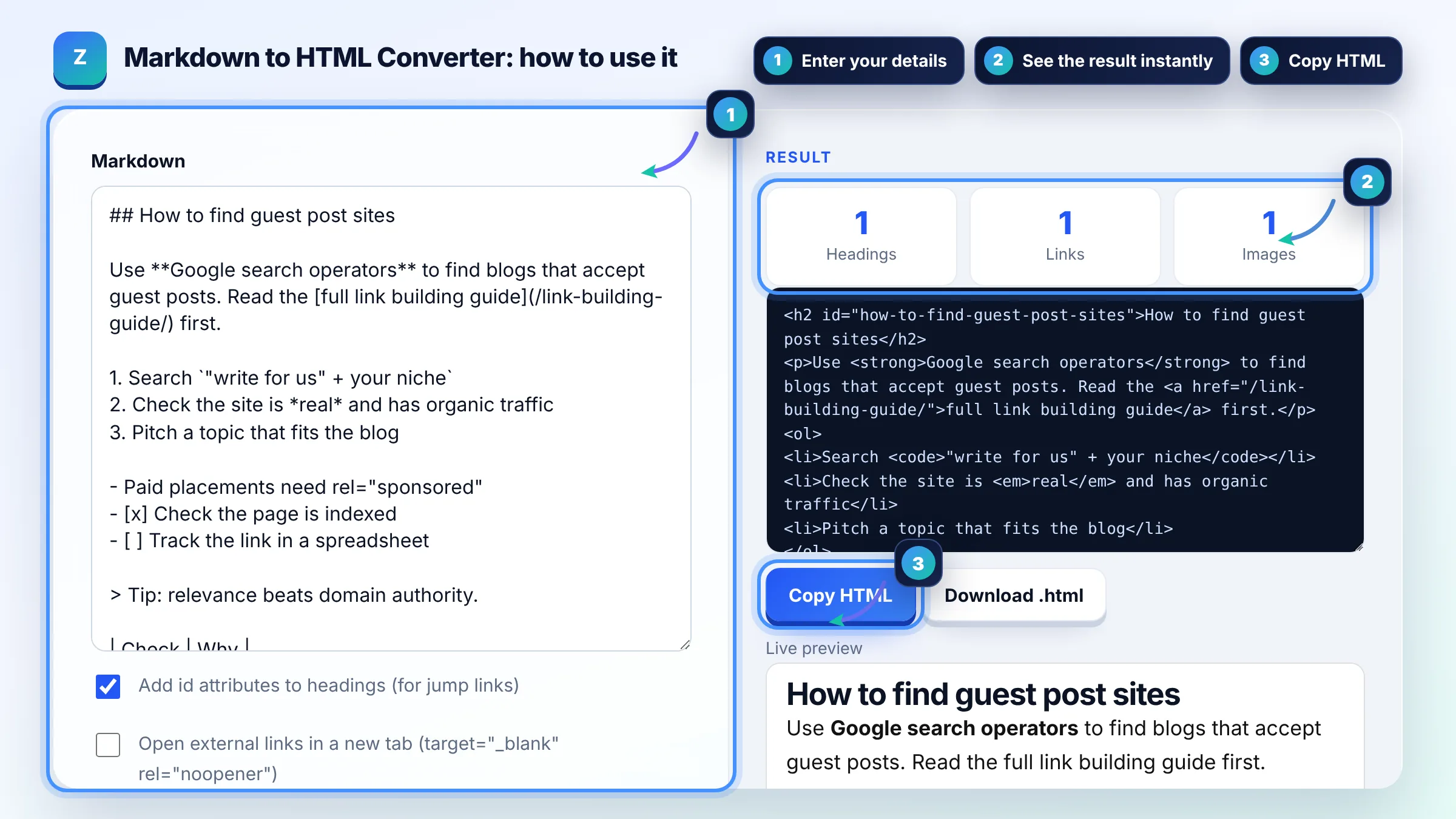
Paste the Markdown into a converter like this one and copy the HTML it produces; there is nothing to install. Each Markdown rule maps to one HTML element, as defined in the CommonMark specification: # to h1, - item to li inside ul, `code` to code, and a blank line ends a paragraph.
No, Google reads the final HTML, so Markdown itself has no SEO effect. Markdown simply makes clean, semantic HTML easier to write: real headings, lists and tables instead of styled divs. What matters for SEO is the content, a logical heading order, descriptive links and alt text on images.
This tool escapes raw HTML inside Markdown on purpose, so a pasted script tag can never run on your site. GitHub Flavored Markdown also filters some tags. If you need custom HTML, add it in your CMS after pasting the converted output.
| Markdown | HTML output | Use it for |
|---|---|---|
| ## Heading | <h2>Heading</h2> | Section headings |
| **bold** and *italic* | <strong> and <em> | Emphasis |
| [text](/url/) | <a href="/url/">text</a> | Links with descriptive anchors |
|  | <img src="img.webp" alt="alt"> | Images with alt text |
| - item / 1. item | <ul> / <ol> with <li> | Lists and steps |
| | a | b | | <table> with th and td | Comparison tables (GFM) |
Example: the default sample has 1 H2, a paragraph with 1 link, an ordered list of 3 steps, a bullet list with 2 task items, a quote, a 2 row table, a code block and 1 image. The converter outputs 1 heading with id="how-to-find-guest-post-sites", counts 1 link and 1 image, adds loading="lazy" to the image and escapes the HTML inside the code block.
Yes. It is free, needs no account and converts everything in your browser with JavaScript. Your text is never uploaded or stored, so it is safe for drafts, client documents and README files that are not public yet.
It supports the GFM features people use most: pipe tables with alignment, task list checkboxes, strikethrough with double tildes, and fenced code blocks with a language class. Rare edge cases of the full specification may render differently from GitHub.
Yes, use the HTML to Markdown converter on this site for the reverse direction. It turns headings, links, lists, images and code back into Markdown and strips scripts and styles, which is handy when moving content between platforms.
Heading ids let you link straight to a section, for example a table of contents or a jump link like /guide/#how-to-pitch. Readers can also share a link to the exact section. The tool builds ids from the heading text and keeps them unique.
It is a usability choice, not an SEO rule. If you open links in a new tab, add rel="noopener" for security, which the tool does automatically. Paid or sponsored links still need rel="sponsored" or nofollow, which you add by hand.
Yes. Paste the output into a Custom HTML block or the code editor of the classic editor. WordPress may add its own paragraph tags in some editors, so check the preview after saving and remove any empty paragraphs.
Facts checked against these official pages. Read how I check facts in my editorial policy.
An HTML minifier is a tool that rewrites markup into fewer bytes without changing what the browser renders.…
An HTML entity encoder is a tool that replaces characters with character references, which start with &…
An HTML to Markdown converter is a tool that walks the HTML element tree and maps each element to its…
Send your website and I will check it for you, free.
One short email when something new goes live: articles, free SEO tools, package updates, discounts and price alerts. No spam, unsubscribe in one click.