Organization Schema Generator
An organization schema generator is a tool that writes schema.org Organization structured data. It gathers…
Build valid Course and ItemList JSON-LD for your course pages in under a minute.
Only mark up courses that are visible on the page. Titles must not include prices, discounts or promotional wording.
The free course schema generator runs in your browser, needs no sign-up and never sends what you type anywhere.
A course schema generator writes Course structured data in JSON-LD. For Google's course list carousel, each course needs a name and description (shown up to 60 characters), a provider is recommended, and you must mark up at least 3 courses with ItemList on a summary or all in one page. Google retired the separate Course info rich result in 2025.
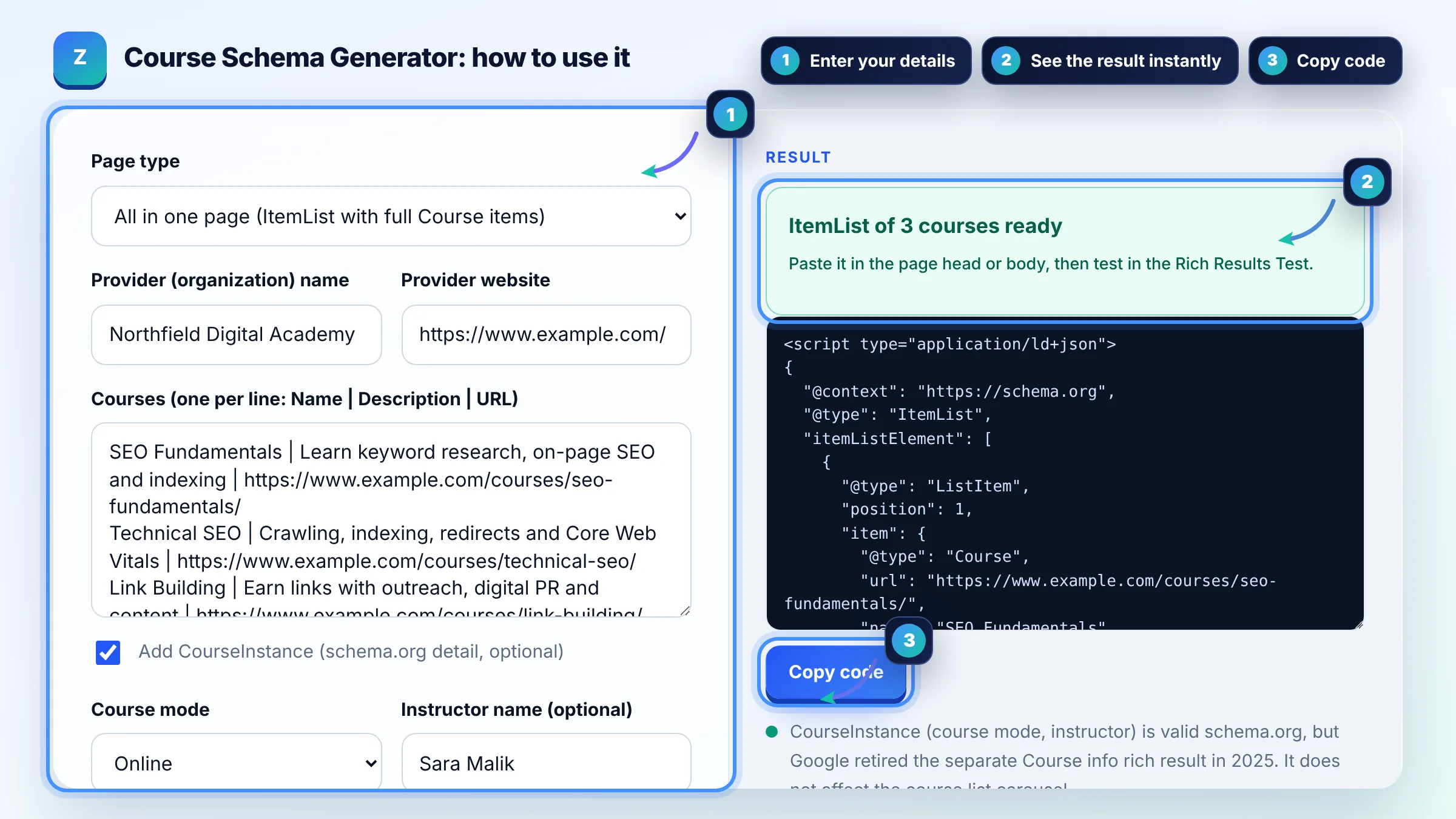
A course schema generator is a tool that turns your course names, descriptions and URLs into schema.org Course markup. It wraps the courses in an ItemList (one ListItem per course with its position and unique URL), adds the provider Organization and, if you want, a CourseInstance with the course mode and instructor.
Yes, the course list carousel is still documented and available in English, but the separate Course info rich result was phased out in 2025 as part of Google's search results simplification. Google's course list structured data guide lists the current requirements: Course with name and description, plus ItemList carousel markup.
You need at least 3 courses marked up. Put them on one all in one page with an ItemList of full Course items, or give each course its own detail page with Course markup and link them from a summary page that holds the ItemList. Every ListItem needs a unique, canonical URL.
A course is a series or unit of curriculum, such as lectures, lessons or modules, with an explicit learning outcome, taught by one or more instructors to a roster of students. A one day public event or a single short how to video is not a course, so do not mark those up as Course.
| Property | Google status | Notes |
|---|---|---|
| name | Required | Course title, no prices or promotional words |
| description | Required | Shown up to 60 characters |
| provider | Recommended | Organization with name and sameAs |
| ItemList, ListItem.position, ListItem.url | Required for the carousel | At least 3 courses, unique URLs |
| hasCourseInstance (courseMode, instructor) | Not used for course list | Valid schema.org; Course info rich result retired in 2025 |
Example: an academy lists SEO Fundamentals, Technical SEO and Link Building on one page with anchors. The tool builds an ItemList with 3 ListItems at positions 1 to 3, each holding a Course with its own URL, a description under 60 characters and Northfield Digital Academy as the provider, plus a CourseInstance with courseMode Online. That meets the 3 course minimum for the carousel.
Paste the script tag in the head or body of the page that shows those courses. On WordPress, use your theme's header settings, a code snippet plugin or the page template. Google reads JSON-LD anywhere in the HTML, as long as the page is indexable.
schema.org allows offers on Course, but Google's current course list documentation does not use them, and course names must not include prices or discounts. Adding offers is not wrong, but it will not unlock a price display in the carousel today.
No. CourseInstance with courseMode, schedule or instructor was used by the Course info rich result, which Google phased out in 2025. For the course list carousel only Course name, description, provider and the ItemList are needed. Keep CourseInstance only if it describes visible details accurately.
Structured data makes a page eligible, but Google never guarantees a rich result. Check that you have at least 3 valid courses, that the page is indexed, that the content is a real course, that the search is in English and that the Rich Results Test shows no errors.
Only if it is a real course: a structured series of lessons with a clear learning outcome and an instructor. A loose playlist of separate tips is not a course. When in doubt, use VideoObject markup for the individual videos instead.
It can be, but Google displays only about 60 characters in the course list, so write the most useful part first. A short line that says what the learner will be able to do, such as "Crawling, indexing, redirects and Core Web Vitals", works well.
Facts checked against these official pages. Read how I check facts in my editorial policy.
An organization schema generator is a tool that writes schema.org Organization structured data. It gathers…
An event schema generator is a tool that writes schema.org Event structured data. It combines dates in ISO…
A JSON-LD validator is a tool that checks structured data written in JSON for Linked Data. It first parses…
Send your website and I will check it for you, free.
One short email when something new goes live: articles, free SEO tools, package updates, discounts and price alerts. No spam, unsubscribe in one click.