Image Alt Text Checker
An alt text checker is a tool that scans HTML for img elements and reads each alt attribute. It treats a…
Describe the image in a few words and get clean alt text plus ready to paste HTML.
The free alt text generator runs in your browser, needs no sign-up and never sends what you type anywhere.
An alt text generator turns what an image shows, its purpose and its context into a short description for the img alt attribute. Good alt text describes the subject and the detail that matters on this page, usually in one phrase under about 125 characters, uses a keyword only if it is accurate, and is empty (alt="") for decorative images.
An alt text generator is a tool that builds the alt attribute for an image from structured details: the subject, the action or key detail, and the setting. It changes the logic by purpose: informative images describe content, linked images describe the destination, images of text repeat the text and decorative images get an empty alt.
Good alt text is a short, accurate description of what the image shows in the context of the page, such as "Dalmatian puppy playing fetch". Google's image SEO best practices call alt text the most important attribute for image metadata and warn against filling it with keywords.
There is no official character limit, but one concise phrase or sentence, often under about 125 characters, works for most images. Write as much as a sighted reader would take from the image on this page, no more. Put long explanations of charts in the page text or a caption.
Use an empty alt (alt="") when the image is purely decorative or repeats text that is already next to it. The W3C decision tree recommends this so screen readers skip the image. Never remove the alt attribute completely, because some screen readers then read out the file name.
| Image type | Alt text approach | Example |
|---|---|---|
| Informative photo | Subject, action, setting | Golden retriever puppy chewing a blue rope toy on a wooden kitchen floor |
| Product photo | Brand or product, variant, view | Stainless steel water bottle, 750 ml, matte black, side view |
| Linked image or icon | Where it goes or what it does | Download the SEO checklist PDF |
| Image of text | The exact text | Free shipping on orders over $50 |
| Chart or diagram | Short summary plus pointer to data | Bar chart of organic clicks by month. Full data in the text below. |
| Decorative | Empty alt | alt="" |
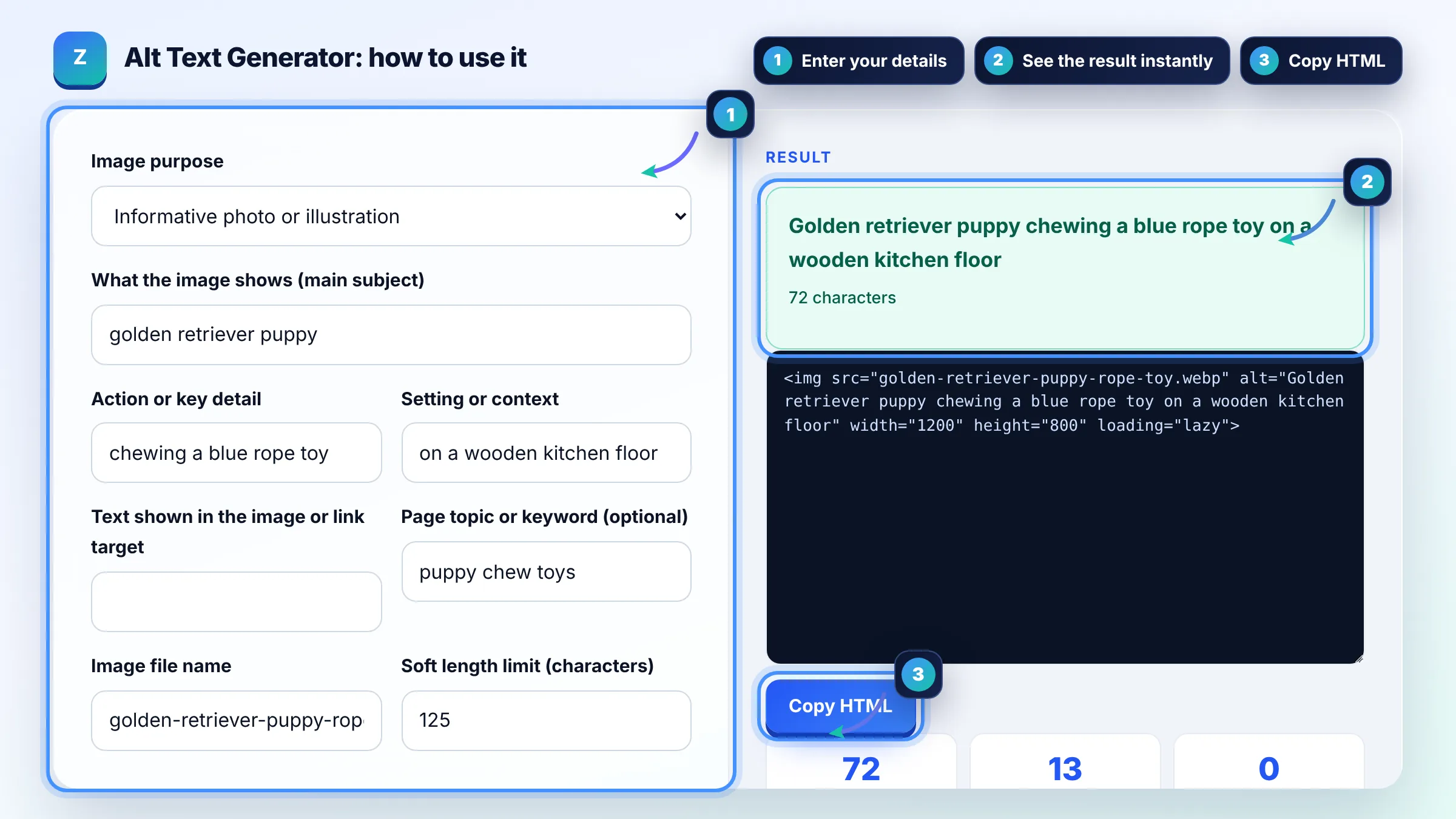
Example: on a page about puppy chew toys, a photo shows a golden retriever puppy with a rope toy. The tool writes "Golden retriever puppy chewing a blue rope toy on a wooden kitchen floor", 72 characters and 13 words. The keyword "puppy chew toys" is not used word for word, which is fine because the description is accurate and already relevant.
Yes, Google uses alt text together with computer vision and the page content to understand an image. Accurate alt text helps your images appear for relevant searches in Google Images. It works best with a descriptive file name, nearby text and a caption that match.
Only when the keyword truthfully describes the image. Google shows a stuffed alt like "puppy dog baby dog pup pups puppies" as a bad example. Write for a person who cannot see the image first; relevance for search follows naturally.
No. Screen readers already announce that the element is an image, so "image of" or "picture of" wastes words. The exception is when the medium matters, for example "Oil painting of" or "Screenshot of the Search Console Page indexing report".
A logo that links to the homepage should describe the destination, such as "Brightside Plumbing home". A logo used as a heading or brand mark uses the company name. If the brand name already appears as text right next to it, an empty alt avoids repetition.
AI image captioning can draft alt text, but it does not know why the image is on your page. Always check the draft, correct mistakes and add the detail that matters for the reader. This tool avoids that problem by building the alt from what you tell it.
No. The alt attribute is the text alternative used by screen readers and search engines when the image cannot be seen. The title attribute shows a tooltip on hover for some users only and is not a replacement for alt text.
Facts checked against these official pages. Read how I check facts in my editorial policy.
An alt text checker is a tool that scans HTML for img elements and reads each alt attribute. It treats a…
An image file name generator is a tool that converts a plain description into a file name that describes the…
An image compressor is a tool that reduces an image's file size by resizing it and re-encoding it with lossy…
Send your website and I will check it for you, free.
One short email when something new goes live: articles, free SEO tools, package updates, discounts and price alerts. No spam, unsubscribe in one click.