Heading Structure Checker
A heading structure checker is a tool that extracts every H1 to H6 element from a page in document order and…
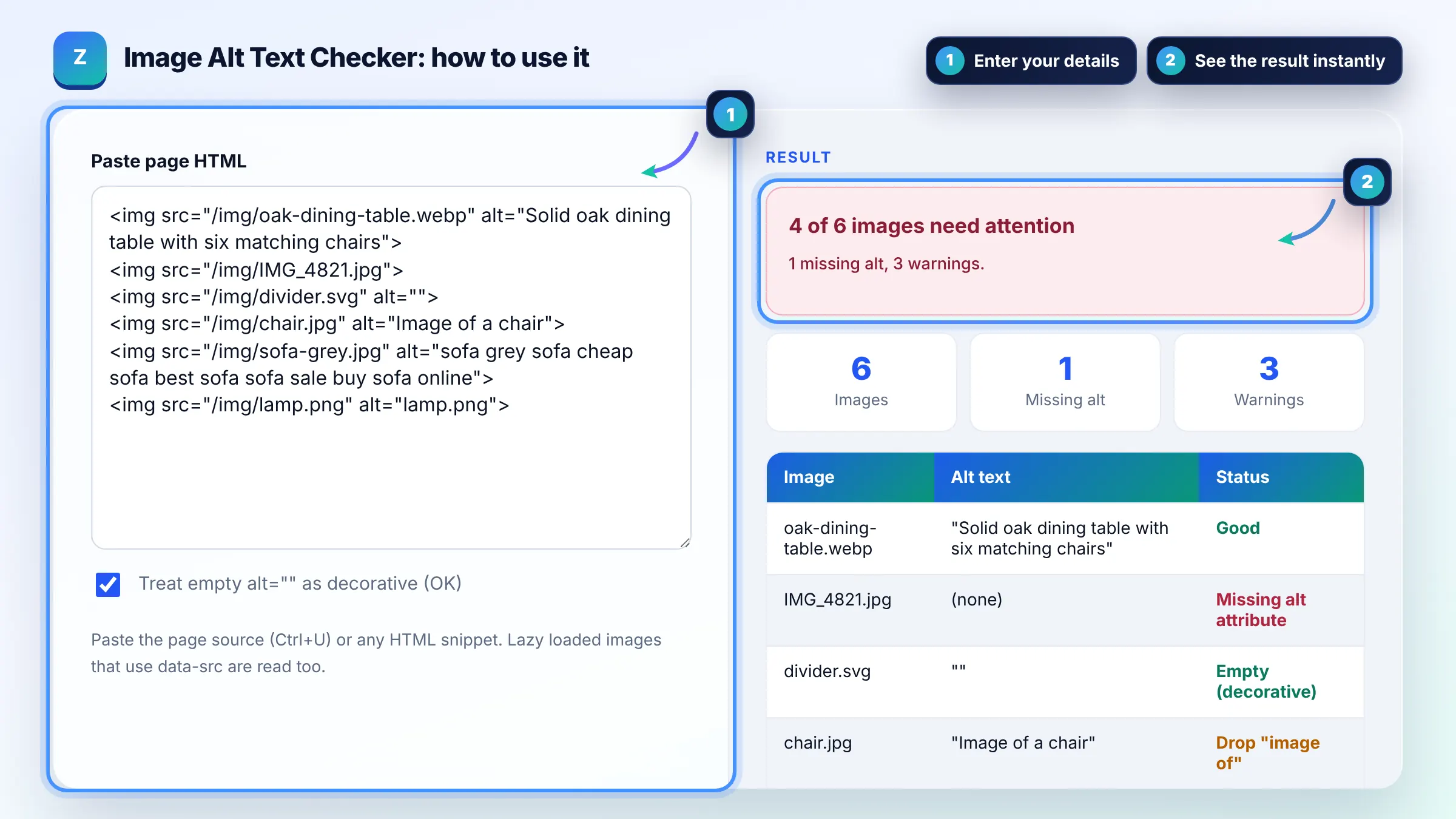
Paste HTML to audit every image and its alt text in one table.
Paste the page source (Ctrl+U) or any HTML snippet. Lazy loaded images that use data-src are read too.
| Image | Alt text | Status |
|---|
Missing alt means the attribute is absent. Screen readers may then read the file name aloud.
The free alt text checker runs in your browser, needs no sign-up and never sends what you type anywhere.
This alt text checker lists every img tag in your HTML with its alt attribute and flags problems: missing alt, empty alt on meaningful images, file names used as alt, "image of" phrasing, keyword stuffing and alt over about 125 characters. Good alt text briefly describes what the image shows and why it is on the page.
An alt text checker is a tool that scans HTML for img elements and reads each alt attribute. It treats a missing attribute as an error, an empty alt as decorative or a warning, and checks the remaining text against simple rules for length, repetition and file name patterns.
Yes. Google uses alt text, along with computer vision and page content, to understand what an image is about, which helps it rank in Google Images. Write useful, information rich alt text and avoid keyword stuffing. See Google's image SEO best practices.
Keep most alt text under about 125 characters, which is roughly one clear sentence. There is no official limit, but long alt text is tiring for screen reader users. If an image needs a long explanation, describe it in the surrounding text or a caption.
No, decorative images should have an empty alt attribute, written as alt="". That tells screen readers to skip them. Leaving the attribute out entirely is different and worse, because some screen readers then read the file name aloud.
| Alt value | Verdict | Better version |
|---|---|---|
| (attribute missing) | Error | Add alt describing the image |
| alt="" on a divider | Fine, decorative | Keep it empty |
| alt="IMG_4821.jpg" | Weak, file name | Brown leather sofa in a bright living room |
| alt="Image of a chair" | Redundant wording | Walnut dining chair with a woven seat |
| alt="sofa cheap sofa best sofa" | Keyword stuffing | Grey three seater sofa with oak legs |
Example: the sample HTML has 6 images. The checker finds 1 with no alt attribute (IMG_4821.jpg), 1 decorative empty alt that passes, and 3 warnings or errors: "Image of a chair", a stuffed alt repeating "sofa" 6 times, and "lamp.png". That gives 4 of 6 images needing work.
Missing alt means the attribute is not there at all, which is an accessibility error. Empty alt, written alt="", is a deliberate signal that the image is decorative and should be ignored by screen readers. Only use empty alt when the image adds no information.
Only when they describe the image naturally. Google warns against filling alt attributes with keywords, which creates a poor experience and can be treated as spam. Describe what is actually shown; if that matches your topic, the relevant words will appear on their own.
No. Screen readers already announce that the element is an image, so "image of" or "picture of" just adds noise. Start straight with the description, for example "Walnut dining chair with a woven seat".
No. It only checks img elements, because CSS background images have no alt attribute. If a background image carries meaning, move it into an img tag with alt text or describe its content in visible text on the page.
When an image is the only content of a link, its alt text acts as the anchor text. Describe where the link goes, such as "Download the 2026 price list", rather than what the picture looks like. Google uses that alt text as anchor text for the link.
No. The checker uses your browser's built in DOMParser, which does not load the images or run scripts. Nothing is sent to a server or saved, so you can audit private and staging pages safely.
Facts checked against these official pages. Read how I check facts in my editorial policy.
A heading structure checker is a tool that extracts every H1 to H6 element from a page in document order and…
A keyword placement checker is a tool that looks for a phrase in specific parts of a page rather than just…
An image file name generator is a tool that converts a plain description into a file name that describes the…
Coming 15 OctSend your website and I will check it for you, free.
One short email when something new goes live: articles, free SEO tools, package updates, discounts and price alerts. No spam, unsubscribe in one click.