CSS Minifier
A CSS minifier is a tool that rewrites a stylesheet into the smallest equivalent text. It protects strings…
Pick colors, angle and type, watch the live preview and copy clean CSS for your site.
The free css gradient generator runs in your browser, needs no sign-up and never sends what you type anywhere.
A CSS gradient generator writes the background-image code for a smooth blend between colors. Use linear-gradient with an angle such as 135deg for banners, radial-gradient for soft spotlights and conic-gradient for pie style effects. Add a solid background color first as a fallback, and keep text on gradients at 4.5:1 contrast.
A CSS gradient generator is a tool that turns your color and angle choices into CSS gradient functions. The pattern is type(direction, color stop, color stop), for example linear-gradient(135deg, #0F6FFF 0%, #7C3AED 100%), where each stop percentage sets where that color is fully reached.
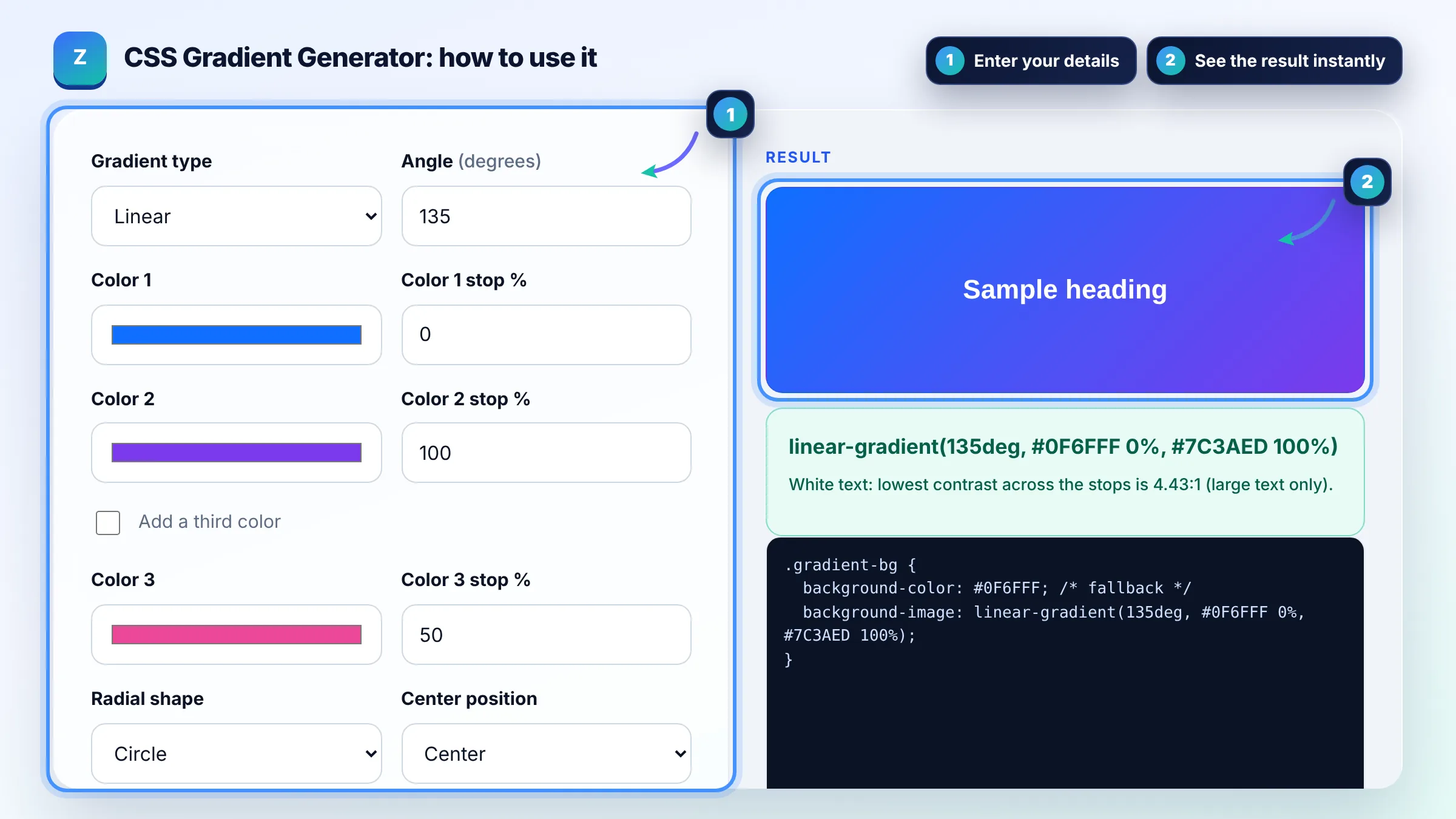
Set background-image to a gradient function, for example background-image: linear-gradient(135deg, #0F6FFF, #7C3AED). Gradients are images in CSS, so they work anywhere an image works, such as background, border-image or mask. MDN explains every option in Using CSS gradients.
A linear gradient blends colors along a straight line at an angle, a radial gradient blends outward from a center point in a circle or ellipse, and a conic gradient rotates colors around a center point like a color wheel. Linear gradients are the most common for website heroes and buttons.
Usually yes: a CSS gradient adds a few dozen bytes of CSS and no extra HTTP request, while a gradient image file can weigh many kilobytes. Gradients also scale to any screen size without blur. Use an image only when you need texture or noise that CSS cannot draw.
| Gradient | Example CSS | Common use |
|---|---|---|
| Linear | linear-gradient(135deg, #0F6FFF, #7C3AED) | Hero sections, buttons, cards |
| Linear with 3 stops | linear-gradient(90deg, #F97316 0%, #EC4899 50%, #8B5CF6 100%) | Brand banners |
| Radial | radial-gradient(circle at center, #FFFFFF, #E0E7FF) | Soft spotlight backgrounds |
| Conic | conic-gradient(from 0deg at center, #22C55E, #0EA5E9, #22C55E) | Pie style and ring effects |
| Hard stop | linear-gradient(90deg, #111 50%, #FFF 50%) | Split two color layouts |
Example: a hero banner with a linear gradient at 135 degrees from #0F6FFF at 0% to #7C3AED at 100% gives background-color: #0F6FFF; background-image: linear-gradient(135deg, #0F6FFF 0%, #7C3AED 100%). White text scores about 4.4:1 on the lighter end and 5.7:1 on the darker end, so use bold, large headings or darken the first color slightly.
A CSS gradient is an image generated by the browser that blends two or more colors smoothly. It is written with functions such as linear-gradient, radial-gradient or conic-gradient and is usually set on the background-image property, so no image file needs to be downloaded.
No, not for current browsers. The unprefixed linear-gradient, radial-gradient and conic-gradient functions are supported in all modern browsers. Adding a solid background-color before the gradient is a simpler and more useful fallback than old prefixes.
Set the gradient as background-image on the text element, then add background-clip: text and color: transparent. Keep a normal color fallback for browsers or settings that do not support it, and check that the text remains readable against the page background.
Give two neighbouring color stops the same position, for example #111 50% and #FFF 50%. The browser then switches colors instantly instead of blending, which is handy for split backgrounds and stripes.
Browsers do not smoothly animate between two gradient values by default. A common technique is a larger background-size with an animated background-position. Keep motion subtle and respect prefers-reduced-motion for users who turn animations off.
No. The preview and code are created in your browser with plain JavaScript. Nothing is uploaded, saved or tracked, so you can experiment freely with client brand colors.
Facts checked against these official pages. Read how I check facts in my editorial policy.
A CSS minifier is a tool that rewrites a stylesheet into the smallest equivalent text. It protects strings…
A color palette generator is a tool that turns one base color into a usable set of website colors. It…
A box shadow generator is a visual tool that writes the CSS box-shadow value for you. The browser draws a…
Coming 28 OctSend your website and I will check it for you, free.
One short email when something new goes live: articles, free SEO tools, package updates, discounts and price alerts. No spam, unsubscribe in one click.