Outreach Email Template Generator
An outreach email template generator is a tool that fills a proven email structure with your details. It…
Measure open, click and reply rates for outreach and newsletter campaigns in one place.
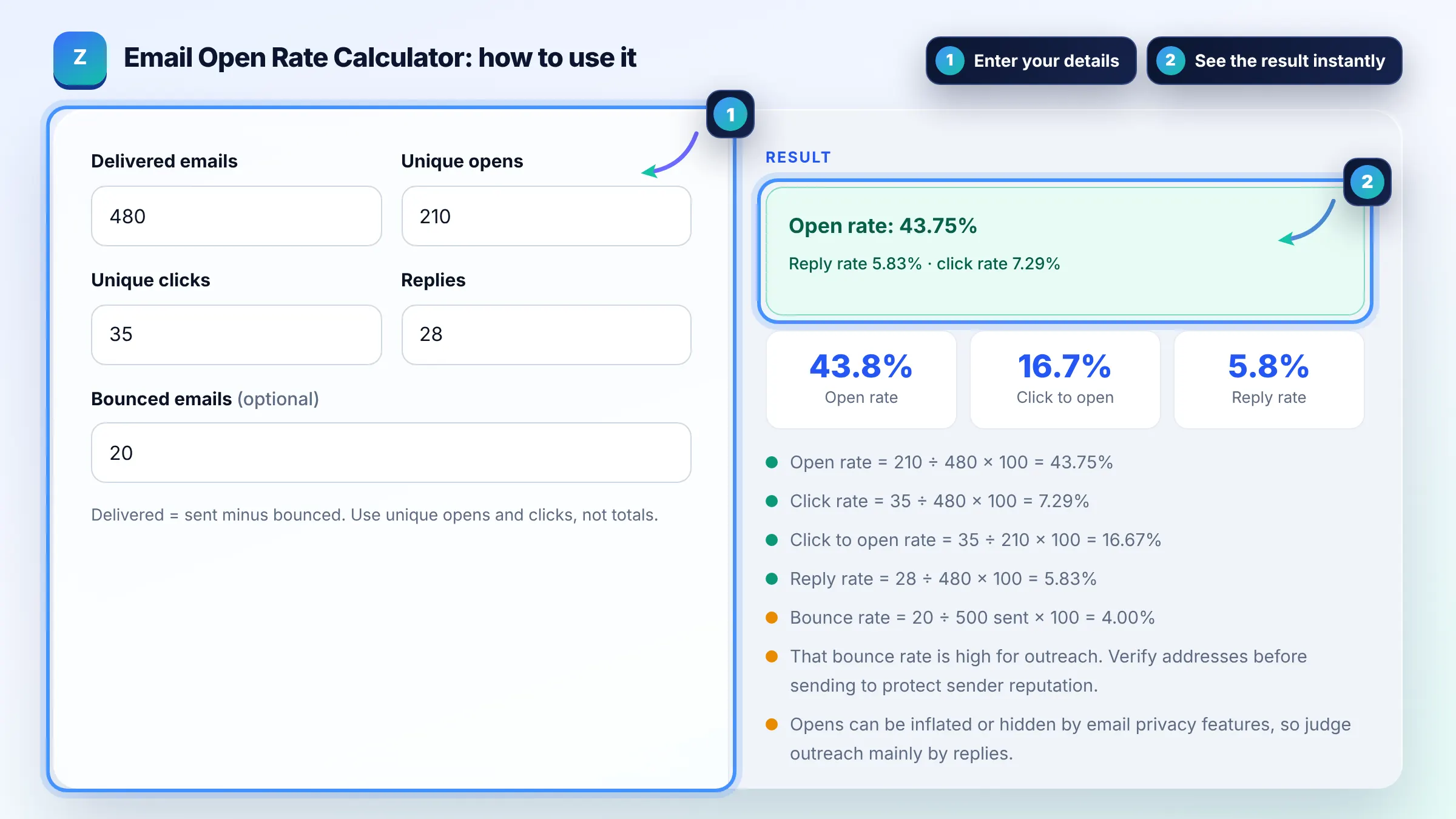
Delivered = sent minus bounced. Use unique opens and clicks, not totals.
The free open rate calculator runs in your browser, needs no sign-up and never sends what you type anywhere.
An open rate calculator divides opened emails by delivered emails and multiplies by 100. 210 opens from 480 delivered is a 43.75% open rate. For link building outreach the reply rate (replies ÷ delivered) matters more, because privacy features in some email apps can inflate opens. Compare campaigns using the same tracking.
An email open rate calculator is a tool that measures how recipients respond to a campaign. Open rate = opens ÷ delivered × 100, click rate = clicks ÷ delivered × 100, click to open rate = clicks ÷ opens × 100 and reply rate = replies ÷ delivered × 100.
Open rate = unique opens ÷ delivered emails × 100, so 120 opens from 400 delivered is 30%. Use delivered, not sent, so bounced emails do not drag the rate down. Always use unique opens, because one person opening an email five times is still one open.
A good outreach reply rate is one that beats your own previous campaigns with a similar list and offer. Personalised pitches to relevant sites usually earn far more replies than mass templates, so track reply rate per template and per niche.
Open tracking uses a tiny image, and some email apps preload images for privacy or block them entirely, which inflates or hides opens. Clicks and replies are more reliable signals. Also follow Google's email sender guidelines to keep messages out of spam.
| Metric | Formula | Example |
|---|---|---|
| Open rate | Opens ÷ delivered × 100 | 210 ÷ 480 = 43.75% |
| Click rate | Clicks ÷ delivered × 100 | 35 ÷ 480 = 7.29% |
| Click to open rate | Clicks ÷ opens × 100 | 35 ÷ 210 = 16.67% |
| Reply rate | Replies ÷ delivered × 100 | 28 ÷ 480 = 5.83% |
| Bounce rate | Bounces ÷ sent × 100 | 20 ÷ 500 = 4.00% |
Example: a guest post outreach campaign sends 500 emails and 20 bounce, so 480 are delivered. With 210 opens, 35 clicks and 28 replies: open rate = 210 ÷ 480 = 43.75%, click to open rate = 35 ÷ 210 = 16.67%, and reply rate = 28 ÷ 480 = 5.83%. The 4% bounce rate means the list needs cleaning.
Click rate divides clicks by all delivered emails, while click to open rate divides clicks by opens only. Click to open rate shows how convincing the email body is for people who actually opened it.
Use delivered emails, which equals sent minus bounces. Bounced emails never reached an inbox, so including them would make every rate look lower than it really is. Track bounces separately to judge list quality.
High bounce rates usually come from guessed or outdated addresses, typos and old lists. Verify addresses before sending, remove hard bounces immediately and avoid bought lists, because repeated bounces hurt your sender reputation.
Send to relevant sites only, personalise the first line, make one clear offer, keep the email short, follow up once or twice politely and send from a domain with proper SPF, DKIM and DMARC authentication set up.
Open rates are still useful for comparing subject lines within the same tool and audience, but treat them as a rough signal. Privacy features in some email apps can count opens that never happened, so rely on clicks and replies.
No. All calculations run in your browser and nothing you type is sent anywhere or saved. Refreshing the page resets the calculator to its example values.
Facts checked against these official pages. Read how I check facts in my editorial policy.
An outreach email template generator is a tool that fills a proven email structure with your details. It…
A guest post pitch generator is a tool that places your details into a tested pitch structure: a personal…
A link insertion email template is a fill in the blanks outreach email for niche edits. It combines the…
Send your website and I will check it for you, free.
One short email when something new goes live: articles, free SEO tools, package updates, discounts and price alerts. No spam, unsubscribe in one click.