Local Business Schema Generator
A local business schema generator is a tool that writes schema.org LocalBusiness structured data in JSON-LD.…
Compare your business name, address and phone across listings and spot every mismatch in seconds.
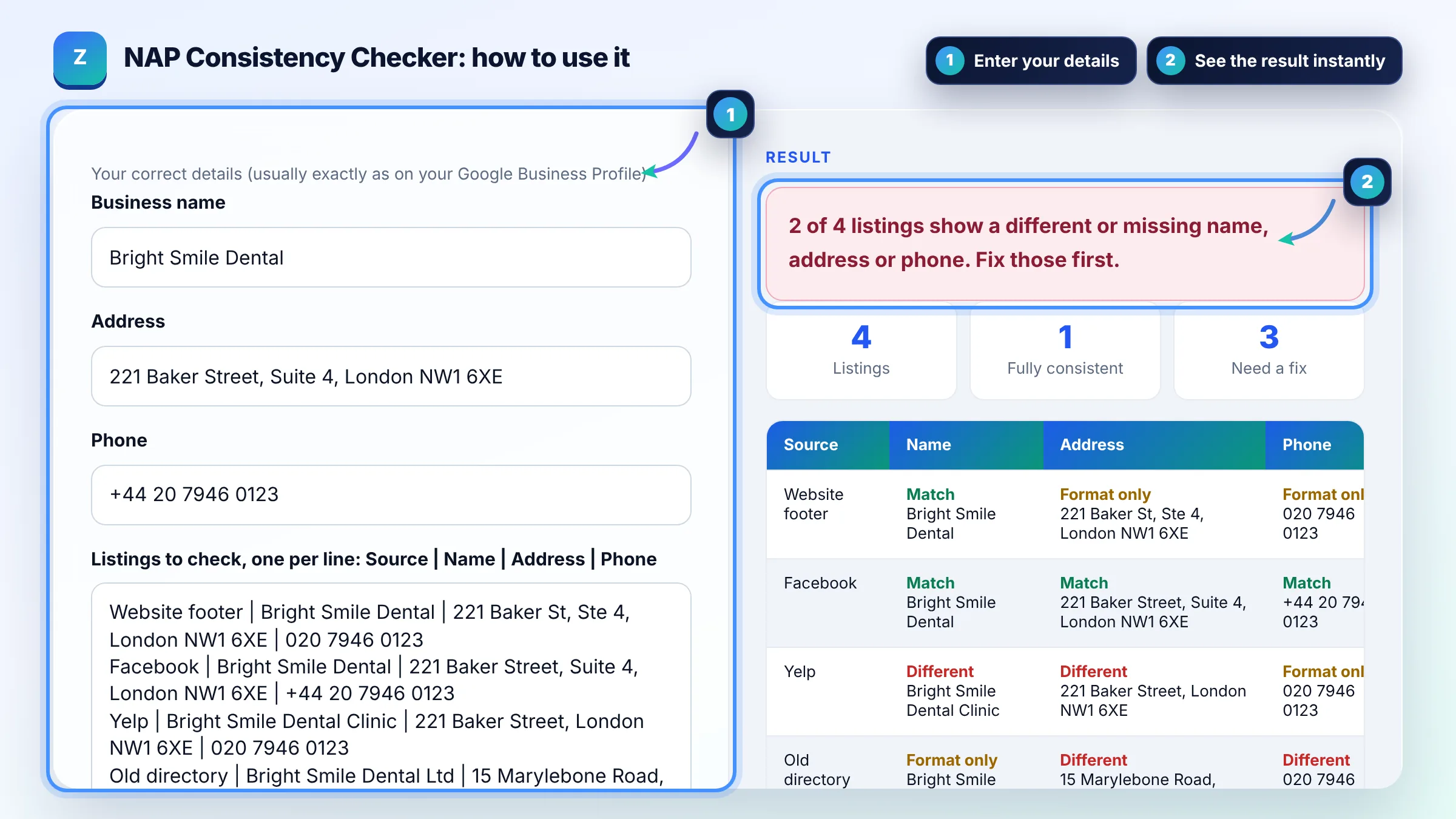
Your correct details (usually exactly as on your Google Business Profile)
Everything is compared in your browser. Nothing is sent anywhere. The sample business and numbers are fictional.
The free nap consistency checker runs in your browser, needs no sign-up and never sends what you type anywhere.
A NAP consistency checker compares the business name, address and phone number shown on your website, Google Business Profile and directories. Real differences, such as an old address or phone number, need fixing first; formatting differences like "St" versus "Street" matter less. Use your Google Business Profile details as the master version.
A NAP consistency checker is a tool that compares each listing's Name, Address and Phone with your correct details. It normalises case, punctuation, common abbreviations and country codes, then labels each field as a match, a formatting difference or a real difference.
NAP consistency means your business name, address and phone number are the same everywhere they appear online. Consistent details help customers and search engines trust that every listing is the same business. Google's guidelines for representing your business ask for your real-world name, a precise address and a phone number that connects to your location.
It matters mostly as accuracy and trust, not as a standalone ranking trick. Google says local results are based mainly on relevance, distance and prominence, and prominence uses information from across the web. Wrong addresses or old phone numbers lose real customers, so fixing them is worth it even before any ranking effect.
Usually no, small formatting differences are low priority compared with a wrong address or phone number. Search engines generally understand common abbreviations. Still, when you edit a listing anyway, copy one exact format so your citations stay clean and easy to audit.
| Difference found | Example | Priority |
|---|---|---|
| Old or wrong address | 15 Marylebone Road vs 221 Baker Street | High: fix now |
| Different phone number | 020 7946 0999 vs 020 7946 0123 | High: fix now |
| Extra words in the name | Bright Smile Dental Clinic | Medium: match your real name |
| Missing suite or unit | 221 Baker Street (no Suite 4) | Medium |
| Abbreviation or punctuation | St vs Street, Ste vs Suite | Low: tidy when editing |
| Country code format | +44 20 vs 020 | Low |
Example: with the sample data, the website footer and Facebook match after formatting, Yelp adds "Clinic" to the name and drops "Suite 4", and an old directory still shows a previous address and phone. The checker marks 2 listings as needing a real fix, with the old directory as the top priority.
NAP stands for Name, Address and Phone number. Some people say NAPW or NAP+W when they include the website URL. These details appear in business listings, called citations, on directories, maps, social profiles and your own website.
Use the details on your Google Business Profile, as long as they are correct and match your real signage and contact details. Then make your website footer and contact page match exactly, followed by Apple Maps, Bing Places, Facebook and industry directories.
No. The checker runs fully in your browser and cannot search other sites. Paste the details from each listing yourself, or export them from your citation tool or a spreadsheet, and the tool compares them instantly.
Yes, if it is part of your real address. Include the suite or unit everywhere in the same format, such as "Suite 4". Missing it on some listings is a medium priority fix because it can send visitors to the wrong door.
Update your Google Business Profile and website first, then every directory you can edit. Search the old address and old phone number to find forgotten listings, because outdated citations keep sending customers to the old location.
Yes. A service area business that serves customers at their location can hide its address on Google Business Profile and set a service area instead. Keep the name and phone consistent everywhere and leave the address off where it is hidden.
Facts checked against these official pages. Read how I check facts in my editorial policy.
A local business schema generator is a tool that writes schema.org LocalBusiness structured data in JSON-LD.…
A Google Business Profile description counter is a tool that counts the characters in your business…
A local citation tracker is a tool or spreadsheet for recording business listings on directories, maps and…
Coming 30 OctSend your website and I will check it for you, free.
One short email when something new goes live: articles, free SEO tools, package updates, discounts and price alerts. No spam, unsubscribe in one click.